How tecRacer achieved 100% Chat Intent Resolution with HelloFresh Chat Bot
I want to know what my customer wants! And I want to automate it. I tried “classical” NLU and “modern” LLM - but we do not understand 100% of the queries. How to achieve that? Well, there is a third twin. Let’s have a look how we achieved 100% correctness with the HelloFresh chatbot intent resolution.
This solution was presented at the German AWS Summit 2025 in Hamburg:
The presenters:
- Cho Hwang, Senior Vice President of Engineering, HelloFresh
- Leon van Ess, Cloud Consultant, tecRacer Germany
- Eva Ramuschkat, Business Unit Lead Solutions, tecRacer Germany
The slides for download: Slides
See AWS Summit Agenda.
What is Intent resolution for chatbots?
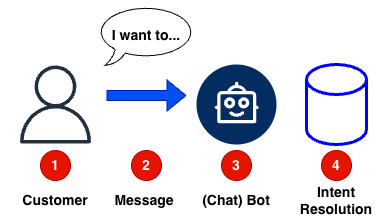
To properly answer a question or an query from a customer (1), at first you need to understand what the customer wants us to do with the chat message (2). This is called intent resolution. A bot (3) uses stored data about Intent (4) to understand the customer’s needs.
Inside the chatbot system, answers or workflows for intents are defined. The reaction from the chatbot can be a static text, if the customer just ask a question like “FAQ” (Frequently Asked Questions) or “Support Article”. Or the bot can react with a dynamic workflow, which includes dynamic data from internal systems like CRM or Shop Systems.
With a static webpage, you know, if the customer clicks “my orders” and “show orders”, that the intent show_customer_orders is triggered. And if there is a support article about “how to order” (3), the intent faq_how_to_order is triggered.
Challenges of intent resolution
But customer do not want to click several times to get an answer or to the right page. So a chatbot is a solution.
Within that solution the challenge remains: How to understand, does the customer want to show_customer_orders or read faq_how_to_order?
To solve that challenge, several methods are available.
Solutions to Resolution
Text-based intent resolution
Here the text (2) coming from the customer (1) matched character by character with the intent resolution database. If “Where is my order?” is the stored intent text:
| Message | Match |
|---|---|
| Where is my order? | Yes |
| Where is this order? | No |
| My Order did not arrive | No |
| What did you do with my stuff, where is it? | No |
This is very fast and cheap. It matches text strings precisely, but it is not very broad.
See the pricing on Lambda pricing. It is even cheaper if you choose ARM-based architecture and use GO instead of Python or Javascript: Lambda language speed comparison.
If you are really bold, you could use Rust or even Zig 😎.
“Classical” NLU
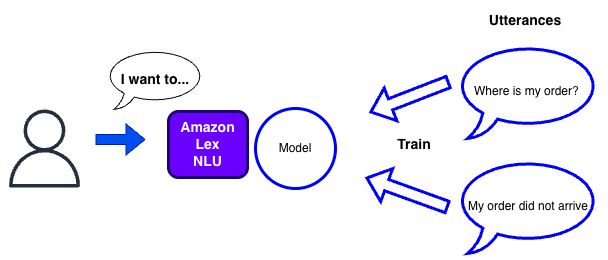
Classical Natural Language Understanding (NLU) uses a trained machine learning model that matches user input against predefined utterances - sample phrases you provide for each intent. For example, to handle “Check Order Status,” you train the model with phrases like “Where is my order?” or “Track my package.” The model learns patterns from these examples and recognizes similar variations. Amazon Lex used to rely on this approach. The results are faster and more predictable.
The pricing is about $0.75 per 1,000 text requests. Not so cheap as Lambda text-based resolution, but still affordable.
There are limitations. Lex is language-specific, so you have to define utterances for each language. And you must discover and define all possible utterances.
| Message | Match |
|---|---|
| Where is my order? | Yes |
| Where is this order? | Yes |
| My Order did not arrive | Yes, depending on the utterances. |
| What did you do with my stuff, where is it? | No |
This is fast and not so costly. It matches several customer inputs, but you have to be creative about utterances. Because it is a trained model, it catches a broader set of messages.
Method 2: Modern LLM
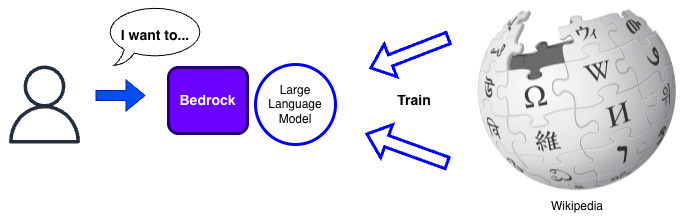
The LLM matches meaning, not text. Trained on a large dataset, like Wikipedia, the LLM can understand a variety of different text which means the same. It is language agnostic, depending on the model used. Means e.g. with Amazon Nova Pro, you understand 200+ languages without additional effort.
An example Prompt could be:
<Task>
Given a user input, classify it into one of the predefined intents and return the corresponding JSON object.
</Task>


<Intents>
show_customer_orders: Triggered when the user requests to view their orders.
faq_how_to_order: Triggered when the user asks about the ordering process.
faq_shipping_options: Triggered when the user inquires about shipping options.
faq_track_order: Triggered when the user wants to know how to track their order.
faq_return_policy : Triggered when the user asks about the return policy.
</Intents>

Input: A string representing the user's query or command.

Output: A JSON object with the following structure:
Only output the json object, noting else

<output>
{
  "input": "user_input",
  "intent": "intentid"
}
</output>


<Examples>

Input: "How do I place an order?" Output:

{
  "input": "How do I place an order?",
  "intent": "faq_how_to_order"
}
Input: "Show me my orders."

Output:
{
  "input": "Show me my orders.",
  "intent": "show_customer_orders"
}

Input: "Where are my orders."

Output:
{
  "input":  "Where are my orders.",
  "intent": "show_customer_orders"
}

Input: "What are the shipping options?" Output:

{
  "input": "What are the shipping options?",
  "intent": "faq_shipping_options"
}
Input: "How can I track my order?" Output:

{
  "input": "How can I track my order?",
  "intent": "faq_track_order"
}
Input: "Do you have a return policy?" Output:

{
  "input": "Do you have a return policy?",
  "intent": "faq_return_policy"
}
Input: "my orders" Output:

{
  "input": "my orders",
  "intent": "show_customer_orders"
}
Input: "show orders" Output:

{
  "input": "show orders",
  "intent": "show_customer_orders"
}
</Examples>
<user input>
Hey bro, what about my order, aie?
</user input>
The problem is, that with ambiguous questions, the Customer Input can also be misunderstood as a query to FAQ or knowledge base.
Test output with that prompt from nova pro 1.0:
{
  "input": "What did you do with my stuff, where is it?",
  "intent": "faq_track_order"
}
{
"input": "Where is my order?",
"intent": "show_customer_orders"
}
(Input tokens: 480 Output Tokens: 24 Latency: 404 ms)
Multi Language example:
{
"input": "Ich h\u00e4tte gerne eine \u00dcbersicht meiner Bestellungen.",
"intent": "show_customer_orders"
}
Colloquial example:
{
"input": "Hey bro, what about my order, aie?",
"intent": "show_customer_orders"
}
“I want to know about my order” could be matched to FAQ articles “here is how ordering works” or it could be interpreted as an inquiry about the current customer order.
And the result is non deterministic. The same question could lead to different results.
| Message | Match |
|---|---|
| Where is my order? | Yes |
| Where is this order? | Yes |
| My Order did not arrive | Maybe |
| What did you do with my stuff, where is it? | Maybe |
Achieve 100% with Chaining
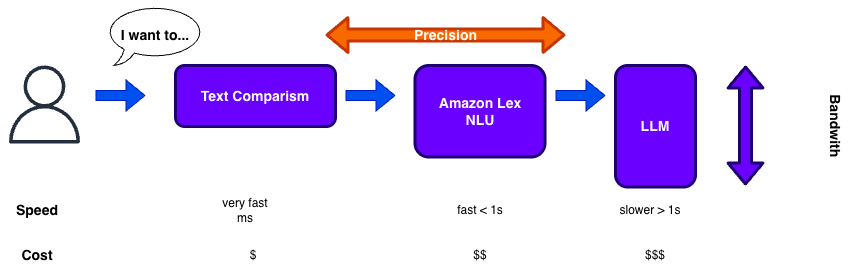
So nowadays, you would start with an LLM (Large Language Model) to support multiple languages at once and catch different utterances. You would also catch “street language” or “street dialect” and match it to the correct intent.
But there are two problems. The solution could be a text comparison, combined with a cache.
Matching LLM misinterpretations
If there are edge cases, where the LLM misinterprets the question, you can use a text similarity algorithm to match the question to the correct intent.
So you can store the input “What did you do with my stuff, where is it?” and map it directly with show_customer_orders, overcoming the weakness of the LLM and achieving a higher matching accuracy!
So the LLM example with wrong intent
{
  "input": "What did you do with my stuff, where is it?",
  "intent": "faq_track_order"
}
Would be resolved to
{
  "input": "What did you do with my stuff, where is it?",
  "intent": "show_customer_orders"
}
Do this with all wrong intent resolutions and you can achieve 100% accuracy.
Lower LLM Costs.
Using an LLM can cost several magnitudes more than a text only comparison. So if you cache the intent resolutions from the LLM and use it for text comparison, the solution will be cheaper and cost less.
With Lambda you may have upto 10 Gig of text storage in memory. Searching this with a simple hash will lead to results in milliseconds.
And a million calls will cost a few dollars.
Lambda Cost
Example 1 Million requests:
AWS Lambda (10GB memory, 200ms duration) Pricing for ARM-based architecture, speed GO based lambda, see Lambda pricing $0.0000133334 for every GB-second $0.20 per 1M requests
- Request charges: 1M requests × $0.20/1M = $0.20
- Compute charges:
- Duration: 1M × 0.2 sec = 200,000 seconds
- GB-seconds: 200,000 × 10GB = 2,000,000 GB-seconds
- Cost: 2,000,000 × $0.0000133334 = $26.67
- Total Lambda cost: $33.53
Pricing Overview
With intent resolution, you describe all intents in a single prompt. This allows you to use a single LLM to resolve multiple intents. But depending on the number of intents, the cost can vary significantly. The prompt defines the input tokens. The output would only be a small ID for the intent:
| Service | 300in/10out | 150in/150out | 100in/200out |
|---|---|---|---|
| Claude 3.5 Sonnet | $1,050 | $2,700 | $3,300 |
| Nova 2 Lite | $150 | - | - |
| Lambda ARM | $27 | $27 | $27 |
Caveats
This post has partly been supported by GenAI.
Summary
The initial method for ChatBots - and also for Amazon Lex is now LLM resolutions because of its flexibility. But as you have seen here, to achieve higher accuracy or a faster answer, you need to combine methods. So LLM is not the answer to everything.
Also be aware of your token usage. Or if you use agents, also your tool usage. Otherwise the “simple” LLM solution could become expensive.
If you need consulting to support your next Connect or GenAI project, don’t hesitate to contact us, tecRacer.
Want to learn GO on AWS? GO here