Brandnew Connect AI Agents with CloudFormation generated prompt is in need of detective work
Amazon Connect has some really cool AI features. One of them is the Agent Assist, which allows agents to quickly access relevant information and insights during customer interactions. To adapt the behaviour to your own needs, you can do some prompt engineering and use your own prompts. And of course we use IAC - infrastructure as code, that means CloudFormation. BUT as the features are so new, the error messages are much to short. So let`s do some detective work. And automation…
Amazon Connect Agent Assist overview
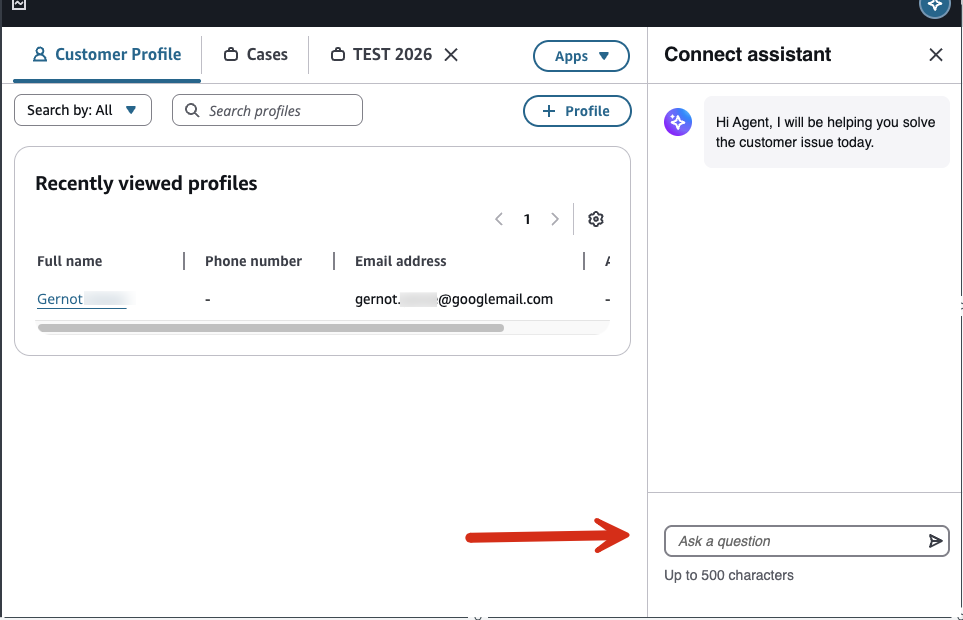
In the lower right corner the agent can ask the Agent Assist for help. This calls a Knowledge Base. The behavior is defined by prompts. You can either create prompts with the AWS Console or with CloudFormation.
AI Prompt Handling via Admin Console
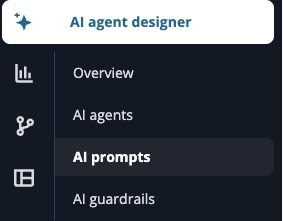

There are predefined prompts, which are called “System Prompts”. There are quite good for a start, but you can also create your own prompts. This should be done with CloudFormation or CDK.
As you see in the API call for the CreateAIPrompt, the
“AI Prompt” has a type, which can be
ANSWER_GENERATION | INTENT_LABELING_GENERATION | QUERY_REFORMULATION
| SELF_SERVICE_PRE_PROCESSING | SELF_SERVICE_ANSWER_GENERATION | EMAIL_RESPONSE
| EMAIL_OVERVIEW | EMAIL_GENERATIVE_ANSWER | EMAIL_QUERY_REFORMULATION
| ORCHESTRATION | NOTE_TAKING | CASE_SUMMARIZATION.
Each type correspond to an apiFormat, which can be MESSAGES | TEXT_COMPLETIONS.
First Problem: As of today, there is no documentation for the mapping from type to apiFormat.
Second Problem: The naming of the service has changed several times.
Currently:
| API Service | CloudFormation | Console | CLI |
|---|---|---|---|
| Amazon Connect/CreateAIPrompt | AWS::Wisdom::AIPrompt | Amazon Connect Agent Assist | qconnect |
CLI explained: E.g. list all existing prompts:
export ASSISTANT_ID=`aws wisdom list-assistants --query "assistantSummaries[0].assistantId" --output text `
aws qconnect list-ai-prompts --assistant-id ${ASSISTANT_ID}
CloudFormation create an AIPrompt
Now you want to create this resource with CloudFormation:
WisdomPromptsANSWERGENERATION:
   Type: AWS::Wisdom::AIPrompt
   Properties:
     ApiFormat: TEXT_COMPLETIONS
     AssistantId: !GetAtt Assistant.AssistantId
     Description: AI Prompt for ANSWER_GENERATION from knowledge base documents
     ModelId: eu.anthropic.claude-3-7-sonnet-20250219-v1:0
     Name: my_de_ANSWER_GENERATION
     TemplateConfiguration:
       TextFullAIPromptEditTemplateConfiguration:
         Text: |
           prompt: |
             You are an experienced multi-lingual assistant tasked with summarizing information from provided documents to provide a concise action to the agent to address the customer's intent effectively. Always speak in a polite and professional manner. Never lie. Never use aggressive or harmful language.

             ... some more lines
     TemplateType: TEXT
     Type: ANSWER_GENERATION
   DependsOn:
     - Assistant
Error Message “Something went wrong”
You get an error message:
1:52:20 PM | CREATE_FAILED        | AWS::Wisdom::AIPrompt      | WisdomPromptsQUERYREFORMULATION85B31C2B
Resource handler returned message: "Error occurred during operation 'AWS::Wisdom::AIPrompt'." (RequestToken: ef0683db-555-73d5-555-cc71a56b0ab5, HandlerErrorCode: GeneralServiceException)
Now you start to wonder, what GeneralServiceException might be?
So let’s sniff a CloudTrail to find out what went wrong.
The Path to find the right evidence
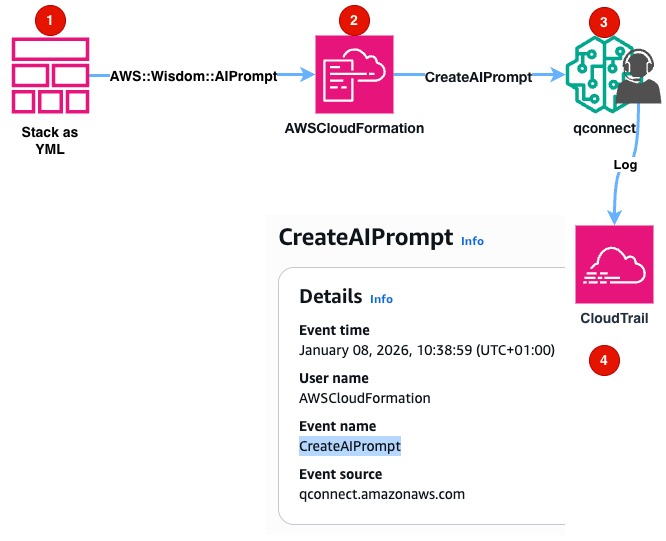 1. You define the resource as YAML text and send the Stack to CloudFormation
2. CloudFormation makes an API Call to qconnect
3. qconnect send the event to CloudTrail
4. Where you can see the event
1. You define the resource as YAML text and send the Stack to CloudFormation
2. CloudFormation makes an API Call to qconnect
3. qconnect send the event to CloudTrail
4. Where you can see the event
The Event Evidence
{
    "eventVersion": "1.09",
    "userIdentity": {
    ...
        "invokedBy": "cloudformation.amazonaws.com"
    },

    "eventSource": "qconnect.amazonaws.com",
    "eventName": "CreateAIPrompt",
    "sourceIPAddress": "cloudformation.amazonaws.com",
    "userAgent": "cloudformation.amazonaws.com",
    "errorCode": "ValidationException",
    "requestParameters": {
        "templateType": "TEXT",
        "assistantId": "555-555-555-555-5555",
        "modelId": "eu.anthropic.claude-3-7-sonnet-20250219-v1:0",
        "apiFormat": "TEXT_COMPLETIONS",
        ...
        "templateConfiguration": {
            "textFullAIPromptEditTemplateConfiguration": {
                "text": "***"
            }
        },
        "type": "QUERY_REFORMULATION",

    },
    "responseElements": {
        "message": "PromptAPIFormat is not supported for the provided PromptType."
    },
    "requestID": "812a11f1-1889-4f78-a33e-f8f535bb841c",
    ...
}
More Details
Here we get an "errorCode": "ValidationException" and "errorMessage": "PromptAPIFormat is not supported for the provided PromptType."
Automate the solution
You could open the AWS console each time, or you switch kiro on and write a script to automate the process.
Its called “cfn-analyzer” or short “CloudFormatioNRootCauseanalyzer.
Source code on github: cfnrc
The script is called cfnrc and is available on github.
Easy conclusion
From CloudFormation General Error
When I deploy CloudFormation, I get this GeneralServiceException:
3:41:28 PM | CREATE_FAILED        | AWS::Wisdom::AIPrompt      | WisdomPromptsQUERYREFORMULATION85B31C2B
Resource handler returned message: "Error occurred during operation 'AWS::Wisdom::AIPrompt'." (RequestToken: 025d9e2e-5089-cd5b-bd9a-35cc6c1e4267, HandlerErrorCode: GeneralServiceException)
To CloudTrail Detailed Message
After a few minutes I run the cfn-analyzer and get the useful information directly from CloudTrail!
    Error Code:   ValidationException

  Detailed Message (from CloudTrail):
    PromptAPIFormat is not supported for the provided PromptType.
Case Closed
In detail:
./cfn-analyzer KnowledgeBaseDev-WisdomKnowledgeBaseV2NestedStackWisdomKnowledgeBaseV2NestedStackResou-UBSAVGCFJ4YC

CloudFormation Error Analyzer

Analyzing stack: KnowledgeBaseDev-WisdomKnowledgeBaseV2NestedStackWisdomKnowledgeBaseV2NestedStackResou-UBSAVGCFJ4YC

Retrieving stack events...
Found 5 error(s) in stack events
Found 3 GeneralServiceException(s), querying CloudTrail for details...

────────────────────────────────────────────────────────────────────────────────
CloudFormation Error Analysis Report
────────────────────────────────────────────────────────────────────────────────

Stack Name:    KnowledgeBaseDev-WisdomKnowledgeBaseV2NestedStackWisdomKnowledgeBaseV2NestedStackResou-UBSAVGCFJ4YC
Analysis Time: 2026-01-08 15:47:57 CET

Summary
────────────────────────────────────────
Total Errors:              5
GeneralServiceExceptions:  3
With CloudTrail Details:   5

Errors
────────────────────────────────────────────────────────────────────────────────

[Error 1]
  Timestamp:     2026-01-08 14:41:31 UTC
  Resource:      WisdomPromptsANSWERGENERATION8475C780
  Resource Type: AWS::Wisdom::AIPrompt
  Status:        UPDATE_FAILED
  Reason:        Resource update cancelled

  CloudTrail Details:
    Event Time:   2026-01-08 14:41:28 UTC
    Event Name:   CreateAIPrompt
    Event Source: qconnect.amazonaws.com
    Error Code:   ValidationException

  Detailed Message (from CloudTrail):
    PromptAPIFormat is not supported for the provided PromptType.

[Error 2]
  Timestamp:     2026-01-08 14:41:28 UTC
  Resource:      WisdomPromptsQUERYREFORMULATION85B31C2B
  Resource Type: AWS::Wisdom::AIPrompt
  Status:        CREATE_FAILED
  Reason:        Resource handler returned message: "Error occurred during operation 'AWS::Wisdom::AIPrompt'." (RequestToken: 025d9e2e-5089-cd5b-bd9a-35cc6c1e4267, HandlerErrorCode: GeneralServiceException)
  ⚠ GeneralServiceException - CloudTrail investigation required

  CloudTrail Details:
    Event Time:   2026-01-08 14:41:28 UTC
    Event Name:   CreateAIPrompt
    Event Source: qconnect.amazonaws.com
    Error Code:   ValidationException

  Detailed Message (from CloudTrail):
    PromptAPIFormat is not supported for the provided PromptType.
Summary
Its really nice that the newest GenAI features are supported by CloudFormation. But the documentation lacks some details. There are not many - or none - examples for the new features.
The clarity of the CloudFormation Error message should be improved!
But other than that, you should use infrastructure as code to make your resource deployment more reliable and scalable. That fact does not change with AI!
If you need developers and consulting to support your decision in your next Connect or GenAI project, don’t hesitate to contact us, tecRacer.
Want to learn GO on AWS? GO here
Enjoy building!
See also
- AWS Api Documentation
CreateAIPrompt - AWS CloudFormation Resource Documentation
AWS::Connect::Prompt](https://docs.aws.amazon.com/AWSCloudFormation/latest/TemplateReference/aws-resource-wisdom-aiprompt.html) - AWS AI IDE kiro
- Source code
cfn-analyzeron github: cfnrc
Thanks to
Foto von British Library auf Unsplash
Funny Outtakes
Maybe I have to rethink my prompt to Nova about summarizing, “come on, Bro” 😎. Nova suggested this:
In our latest blog post, we hav talk 'bout dem exciting new AI stuffs Amazon Connect jus' add. We reaaaally like dis Agent Assist feature. It heल्प agents get da right info fast when dey talkin' to customers, makin' tings run smoother. Now, we know how important it be to change how da AI acts to fit what yuh need, so we use somethin' calle' Infrastructure as Code (IaC) wit' CloudFormation to make dis happen.

But, we face some challenge wit' dese new features. Dey don' give us enough details when tings go wrong. So, we hav to do some "detective work" to figure out what's up. We show yuh how we make an AI prompt using CloudFormation and how we deal wit' a tricky error calle' "GeneralServiceException" by lookin' at CloudTrail logs. To make dis easier, we introduce a lil' script calle' "cfn-analyzer" to automate da troubleshootin'.

In da end, we remind every1 'bout da big role detail error handlin' and automation play in managin' AWS resources. If yuh need help wit' yuh Connect or GenAI projects, we say drop tecRacer a line. Also, if yuh wanna learn 'bout GO on AWS, we got a link to a cool Udemy course. We cap it off wit' a pretty picture from da British Library, grabbed from Unsplash.