Building Type-Safe Serverless Applications with Prisma, Lambda, and Private RDS
Running Prisma ORM in AWS Lambda with RDS in a private VPC is a good pattern for building type-safe serverless applications. However, documentation on this setup is sparse, and developers typically encounter two critical challenges that aren’t immediately obvious: correctly bundling Prisma’s binary dependencies for Lambda’s environment and automating database migrations through CDK without external CI/CD orchestration.
Introduction - Where type safety meets serverless infrastructure
Running Prisma ORM in AWS Lambda with RDS in a private VPC is a good pattern for building type-safe serverless applications. However, documentation on this setup is sparse, and developers typically encounter two critical challenges that aren’t immediately obvious: correctly bundling Prisma’s binary dependencies for Lambda’s environment and automating database migrations through CDK without external CI/CD orchestration.
This guide walks through a production-ready implementation that addresses both challenges, allowing you to manage your database schema alongside your infrastructure code.
High-Level Architecture Overview - The complete picture
The architecture consists of two Lambda functions working in tandem:
- Database Handler Lambda — Your application code that reads/writes data using Prisma ORM
- Migration Lambda — A custom CloudFormation resource that runs database migrations automatically during stack deployment
Both Lambda functions run in private VPC subnets with no internet access. They retrieve database credentials from AWS Secrets Manager (via a VPC endpoint) and connect to RDS on port 5432. The migration Lambda is triggered by CloudFormation before the main handler Lambda starts, ensuring migrations are always applied before application code runs.
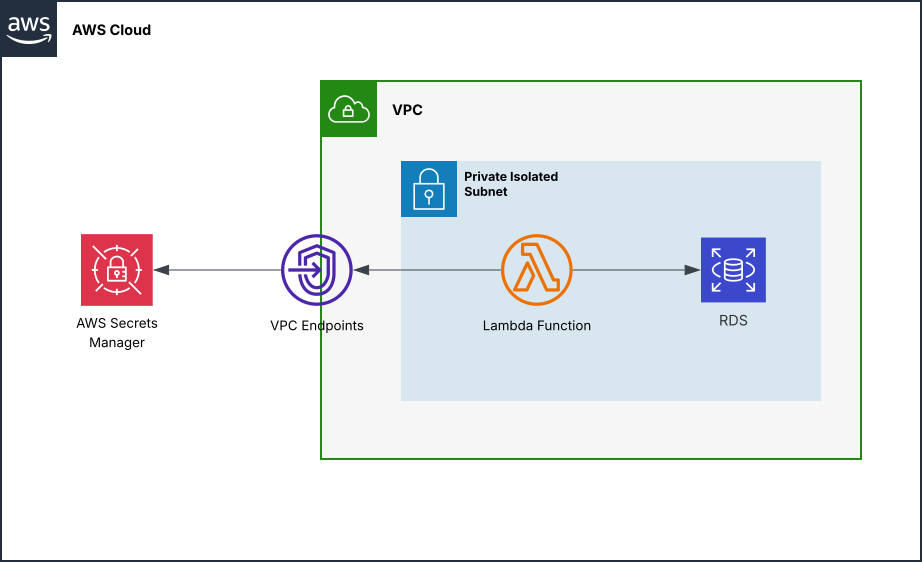
Key Challenges - The hidden complexity beneath the surface
Challenge 1: Binary Bundling for Lambda’s Linux Environment
Prisma relies on native query engine binaries compiled for specific operating systems. Lambda runs Amazon Linux 2 (RHEL-based), which requires the rhel-openssl-3.0.x binary target.
The Problem:
- Default Prisma installations include binaries for multiple platforms (~50MB total)
- Lambda has a 50MB deployment package size limit (250MB unzipped)
- Both the handler and migration Lambda need the correct binaries, but bundling naively bloats the package
- The Prisma client must be generated from your schema before deployment—without it, you have no type definitions for your database, and the code cannot run
The Solution: Configure CDK’s bundling hooks to optimize the pre-generated client:
- Copy the pre-generated client into the bundle
- Remove non-RHEL query engine binaries (keep only
rhel-openssl-3.0.x) - Strip unnecessary files (
.md,.txt,.d.ts) to reduce size - Ensure binaries have correct executable permissions
Client generation itself is a prerequisite step (covered in “Deployment Prerequisites and Order” below).
Challenge 2: Automating Migrations with CDK
Running database migrations in a CI/CD pipeline decouples infrastructure from schema changes, creating coordination overhead. Ideally, migrations should run automatically when you deploy your stack.
The Problem:
- Migrations must run before the main handler is deployed, but CDK doesn’t natively support this dependency
- You need a way to trigger migrations automatically whenever the schema changes, without manual intervention
The Solution:
- Wrap it in a CloudFormation Custom Resource that runs during stack Create/Update
- Hash the Prisma schema file; when the hash changes, CloudFormation re-invokes the migration Lambda automatically
- Add explicit CDK dependencies so the handler Lambda only starts after migrations complete
Implementation Details - From theory to production-ready code
Understanding the Prisma Schema
Before bundling Lambda functions, it’s essential to understand how Prisma generates the client code from your schema. The schema.prisma file has two critical configurations:
Generator block — Tells Prisma where and how to generate the client:
generator client {
  provider = "prisma-client-js"
  output   = "../generated/prisma-client"
  engineType = "binary"
  binaryTargets = ["native", "rhel-openssl-3.0.x"]
}
The binaryTargets setting is critical for Lambda deployment. It specifies which query engine binaries to build: native for your local development machine, and rhel-openssl-3.0.x for Amazon Linux 2 (Lambda’s OS). Without the RHEL target, the migration Lambda will fail in production.
Datasource block — Defines your database connection:
datasource db {
  provider = "postgresql"
  url      = env("DATABASE_URL")
}
The DATABASE_URL environment variable is set at runtime by the Lambda handler (fetched from Secrets Manager).
Database models — Define your tables and relationships. For example, the example includes an Author model with a one-to-many relationship to Post:
model Author {
  id    Int     @id @default(autoincrement())
  email String  @unique
  name  String
  posts Post[]  // One-to-many relationship
}

model Post {
  id       Int     @id @default(autoincrement())
  title    String
  authorId Int
  author   Author  @relation(fields: [authorId], references: [id])
}
Running npx prisma generate reads this schema and creates TypeScript type definitions and query methods in the output directory. This generated code is what gets bundled into your Lambda functions. For detailed information on schema syntax, relationships, and other Prisma features, see the Prisma schema documentation.
Bundling Strategy: Handler Lambda
The handler Lambda imports the generated Prisma client and needs query engine binaries to execute database operations:
const esmPolyfill = `
import { createRequire } from 'module';
import { dirname } from 'path';
import { fileURLToPath } from 'url';
const require = createRequire(import.meta.url);
const __dirname = dirname(fileURLToPath(import.meta.url));
`;

const lambdaFunction = new NodejsFunction(this, 'PrismaHandler', {
  entry: 'src/handler.ts',
  handler: 'handler',
  runtime: Runtime.NODEJS_20_X,
  vpc,
  vpcSubnets: {
    subnetType: SubnetType.PRIVATE_ISOLATED,
  },
  securityGroups: [lambdaSecurityGroup],
  timeout: Duration.seconds(30),
  memorySize: 512,
  environment: {
    DATABASE_SECRET_ARN: dbInstance.secret?.secretArn ?? '',
  },
  bundling: {
    nodeModules: [],
    minify: true,
    sourceMap: false,
    format: OutputFormat.ESM,
    banner: esmPolyfill, // ESM polyfills for require, __dirname, etc.
    metafile: true,
    bundleAwsSDK: true,
    mainFields: ['module', 'main'],
    commandHooks: {
      beforeBundling: (inputDir: string, outputDir: string) => [
        // Copy pre-generated Prisma client
        `cp -r ${inputDir}/src/generated ${outputDir}/`,
      ],
      beforeInstall: () => [],
      afterBundling: (inputDir: string, outputDir: string) => [
        // Create Prisma client directory structure
        `mkdir -p ${outputDir}/src/prisma-schema/generated/prisma-client`,
        `cp -r ${outputDir}/generated/prisma-client/* ${outputDir}/src/prisma-schema/generated/prisma-client/`,
        // Remove unnecessary files to reduce bundle size
        `find ${outputDir}/src/generated/prisma-client -name "*.md" -delete || true`,
        `find ${outputDir}/src/generated/prisma-client -name "*.txt" -delete || true`,
        `find ${outputDir}/src/generated/prisma-client -name "*.d.ts" -delete || true`,
        // Keep only RHEL query engine (Lambda's OS)
        `find ${outputDir}/src/generated/prisma-client -name "query-engine-*" ! -name "*rhel*" -delete || true`,
        `find ${outputDir}/src/generated/prisma-client -name "libquery_engine-*" ! -name "*rhel*" -delete || true`,
      ],
    },
  },
});

dbInstance.secret?.grantRead(lambdaFunction);
Key points:
nodeModules: []— Don’t bundle node_modules; esbuild handles dependenciesformat: OutputFormat.ESM— Use ES modules (matches package.json “type”: “module”)banner: esmPolyfill— Inject polyfills forrequire,__dirnamethat ESM lacks- beforeBundling: Copy pre-generated Prisma client (from
src/generated/) - afterBundling: Remove non-RHEL binaries and unnecessary documentation to shrink the bundle
Bundling Strategy: Migration Lambda
The migration Lambda needs the full Prisma CLI to run prisma migrate deploy. It must also include the Prisma schema and binaries:
this.migrationFunction = new NodejsFunction(this, 'MigrationFunction', {
  entry: 'src/migration-lambda.ts',
  handler: 'handler',
  runtime: Runtime.NODEJS_20_X,
  timeout: Duration.minutes(10), // Longer timeout for migrations
  memorySize: 1024, // More memory for migration operations
  vpc: props.vpc,
  securityGroups: [props.migrationSecurityGroup],
  environment: {
    DATABASE_SECRET_ARN: props.databaseSecret.secretArn,
  },
  bundling: {
    nodeModules: ['prisma'], // Bundle Prisma CLI
    minify: true,
    sourceMap: false,
    format: OutputFormat.ESM,
    banner: esmPolyfill,
    metafile: true,
    bundleAwsSDK: true,
    mainFields: ['module', 'main'],
    commandHooks: {
      beforeBundling: (inputDir: string, outputDir: string) => [
        // Create prisma directory and copy schema
        `mkdir -p ${outputDir}/prisma`,
        `cp -r ${inputDir}/src/prisma-schema/* ${outputDir}/prisma/`,
      ],
      beforeInstall: () => [
        // Set target binary for Prisma during npm install
        'export PRISMA_CLI_BINARY_TARGETS=rhel-openssl-3.0.x',
      ],
      afterBundling: (inputDir: string, outputDir: string) => [
        // Copy WASM files (Prisma's query engine uses WASM)
        `find ${outputDir}/node_modules/prisma/build -name "*.wasm" -exec cp {} ${outputDir}/node_modules/.bin/ \\; || true`,
        `find ${outputDir}/node_modules/prisma -name "*.wasm" -exec cp {} ${outputDir}/node_modules/.bin/ \\; || true`,
        // Copy query engine binaries
        `find ${outputDir}/node_modules/prisma -name "query-engine-*" -exec cp {} ${outputDir}/node_modules/.bin/ \\; || true`,
        // Make binaries executable
        `chmod +x ${outputDir}/node_modules/.bin/* || true`,
        // Create package.json files for Prisma to locate resources
        `echo '{"name": "lambda-prisma", "version": "1.0.0", "main": "index.js", "dependencies": {"prisma": "*", "@prisma/client": "*"}}' > ${outputDir}/node_modules/package.json`,
        `echo '{"name": "lambda-migration", "version": "1.0.0", "main": "index.js", "dependencies": {"prisma": "*", "@prisma/client": "*"}}' > ${outputDir}/package.json`,
      ],
    },
  },
});

props.databaseSecret.grantRead(this.migrationFunction);
Key points:
nodeModules: ['prisma']— Bundle the Prisma CLI (the handler Lambda doesn’t need it)timeout: Duration.minutes(10)— Migrations can take longer than typical Lambda invocationsmemorySize: 1024— Extra memory for compilation/migration work- beforeInstall: Set
PRISMA_CLI_BINARY_TARGETSto ensure RHEL binary is built - afterBundling: Copy WASM files and query engine binaries to a location where Prisma CLI can find them
CloudFormation Custom Resource: Automatic Migrations
Wrap the migration Lambda in a CloudFormation Custom Resource to trigger migrations automatically:
const migrationHandler = new DatabaseMigrationHandler(this, 'DatabaseMigration', {
  vpc,
  databaseSecret: dbInstance.secret!,
  migrationSecurityGroup: lambdaSecurityGroup,
  schemaVersion: generateSchemaHash(), // Hash detects schema changes
});

// Ensure migrations run after database is ready
migrationHandler.customResource.node.addDependency(dbInstance);

// Ensure handler Lambda only starts after migrations complete
lambdaFunction.node.addDependency(migrationHandler.customResource);
The DatabaseMigrationHandler construct:
export class DatabaseMigrationHandler extends Construct {
  public readonly customResource: CustomResource;

  constructor(scope: Construct, id: string, props: DatabaseMigrationHandlerProps) {
    super(scope, id);

    const migrationFunction = new NodejsFunction(this, 'MigrationFunction', {
      // ... (bundling configuration shown above)
    });

    props.databaseSecret.grantRead(migrationFunction);

    const provider = new Provider(this, 'MigrationProvider', {
      onEventHandler: migrationFunction,
    });

    this.customResource = new CustomResource(this, 'DatabaseMigration', {
      serviceToken: provider.serviceToken,
      properties: {
        SchemaVersion: props.schemaVersion,
      },
      removalPolicy: RemovalPolicy.DESTROY,
    });
  }
}
How it works:
- CDK hashes
schema.prismaviagenerateSchemaHash() - The hash is passed as the
SchemaVersionproperty to the Custom Resource - During stack Create/Update, CloudFormation invokes the migration Lambda
- When you modify
schema.prisma, the hash changes, triggering re-execution - The migration Lambda runs
prisma migrate deployto apply pending migrations
Migration Lambda Handler
The migration Lambda handles CloudFormation lifecycle events:
export const handler = async (event: CloudFormationEvent): Promise<CloudFormationResponse> => {
  const controller = new DatabaseMigrationController();
  return await controller.handleEvent(event);
};

class DatabaseMigrationController {
  async handleEvent(event: CloudFormationEvent): Promise<CloudFormationResponse> {
    const { RequestType, ResourceProperties } = event;

    // Fetch database credentials from Secrets Manager
    const secretsClient = new SecretsManagerClient();
    const secrets = await secretsClient.send(
      new GetSecretValueCommand({
        SecretId: process.env.DATABASE_SECRET_ARN || '',
      })
    );

    const { username, password, host, port, dbname } = JSON.parse(secrets.SecretString || '');
    process.env.DATABASE_URL =
      `postgresql://${username}:${password}@${host}:${port}/${dbname}/?schema=public`;

    switch (RequestType) {
      case 'Create':
      case 'Update':
        return await this.deployMigrations();
      case 'Delete':
        return await this.getMigrationStatus();
      case 'Reset':
        return await this.resetDatabase();
      // ... other cases
    }
  }

  private async deployMigrations() {
    execSync('npx prisma migrate deploy', { stdio: 'inherit' });
    // Success response...
  }
}
Handler Lambda: Fetching Credentials at Runtime
The handler Lambda initializes Prisma with credentials fetched from Secrets Manager on cold start:
import { PrismaClient } from './generated/prisma-client/client.js';
import { GetSecretValueCommand, SecretsManagerClient } from '@aws-sdk/client-secrets-manager';

const secretsClient = new SecretsManagerClient();
const secrets = await secretsClient.send(
  new GetSecretValueCommand({
    SecretId: process.env.DATABASE_SECRET_ARN || '',
  })
);

const { username, password, host, port, dbname } = JSON.parse(secrets.SecretString || '');

const prisma = new PrismaClient({
  datasourceUrl: `postgresql://${username}:${password}@${host}:${port}/${dbname}?schema=public`,
});

export const handler = async (event: LambdaEvent): Promise<LambdaResponse> => {
  try {
    // Your database operations here
    const author = await prisma.author.create({
      data: { name: event.name, email: event.email },
    });
    return { statusCode: 201, body: JSON.stringify(author) };
  } catch (error) {
    console.error('Error:', error);
    return {
      statusCode: 500,
      body: JSON.stringify({ error: 'Internal server error' }),
    };
  }
  // No need to disconnect—Lambda container is destroyed after invocation
};
Key points:
- Top-level await: Credentials are fetched once per Lambda container (on cold start)
- Runtime initialization: Subsequent invocations reuse the Prisma connection pool
- No explicit disconnect needed: Lambda’s container is destroyed after invocation, so connections are automatically cleaned up
- Import path: Must import from
./generated/prisma-client/client.js, not@prisma/client
Additional Considerations - Things that can be easily forgotten
Bundle Size Management
To keep bundles lean:
- Remove non-RHEL binaries in the
afterBundlinghook - Delete documentation files (
.md,.txt) - Use
minify: trueandsourceMap: falsein bundling config - Only include
prismapackage in migration Lambda’snodeModules
Deployment Prerequisites and Order
Before deploying, ensure:
-
Generate Prisma client locally:
npx prisma generateThis creates
src/generated/prisma-client/, which the handler Lambda copies during bundling. -
Create and validate migrations:
npx prisma migrate dev --name init
npx prisma migrate deploy
This creates migration files in
src/prisma-schema/migrations/, which the migration Lambda uses. -
Build the CDK stack:
npm run buildSynthesizes the CloudFormation template and bundles Lambda functions.
-
Deploy:
npm run deployCDK creates the RDS instance, then automatically runs migrations, then deploys the handler Lambda.
Prisma Client Generation in the Build Pipeline
The generated Prisma client (in src/generated/prisma-client/) should not be committed to version control. Instead:
- Add
src/generated/to.gitignore - Run
npx prisma generateas part of your build/deployment process - During local development, run
npx prisma generateafter any schema changes - In CI/CD, ensure
npm installandnpx prisma generaterun before CDK synthesis
This ensures the bundled client always matches your current schema and avoids version mismatches.
Conclusion - Bringing it all together
Combining Prisma ORM with AWS Lambda and RDS in a private VPC enables type-safe, serverless database access without external migration orchestration. By properly bundling Prisma’s binaries for Lambda’s environment and automating migrations through CDK’s Custom Resources, you achieve a cohesive infrastructure-as-code experience where schema changes, migrations, and application code deploy together.
The pattern shown here provides a foundation for building scalable, maintainable serverless applications.
If you need consulting to support your next AWS project, don’t hesitate to contact us, tecRacer.
