Schnelly, the racing snail: Infrastructure as Code on AWS up to 8 times faster with TypeScript 7 and other GO/Rust based tools
For your serverless AWS project you decide the Infrastructure as Code framework and the language for your serverless Lambda functions. In the last years in projects I often heard “we can only do X, because this is the development language we know”. Is this argument still valid with agentic coding? To be able to decide, you should be aware how much time in the steps of the development cycle you need. The new TypeScript 7 is 10 times faster than before. Does this make CDK significantly faster? Let’s build and see:
Global and local Optimization
To optimize a system, you should at first look at the global system to have an overview. Then you can decide which parts are worth optimizing.
Because “Premature Optimization Is the Root of All Evil”.
So in the first part I look at a whole deploy of infrastructure and code. After that I look more closely at optimizing a Python app.
The global cycle
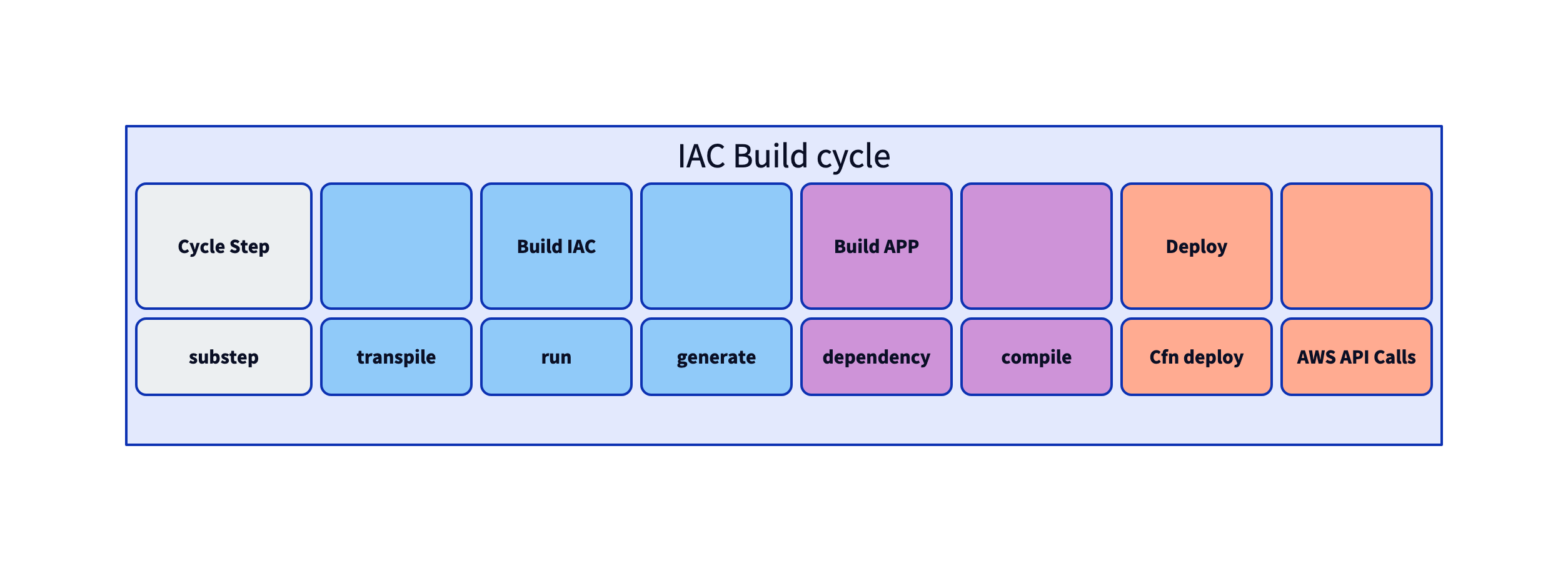
For more complex IaC (Infrastructure as Code) frameworks, a Build IaC cycle is the first step.
Scripting languages are a synonym to interpreted languages, but you need steps for packaging the dependencies.
For creating the infrastructure aka deploy, CDK/CloudFormation use two steps. In the AWS API Calls step the resources are created. An example is the CreateFunction call to the AWS Lambda API.
Measure the global development cycle
If you want a realistic measurement of how much your environment slows you down, assume how often you deploy your infrastructure and Lambda code.
- Deploy full
- Changes: 10 times
- Deploy lambda: 20 times
- Destroy
I use the tecRacer “trick” serverless benchmark suite as demo project:
Using https://github.com/tecracer/tRick-benchmarks/tree/master
All IaC and Lambda code has identical features!
Intro remarks
The handbrake on development systems is the virus scanner. This test was made on a system w/o virus scanner. The OS is: Mac Mini Apple M4.
Initialize the system
For the AWS CDK - Cloud Development Kit we install node and a docker runtime, e.g.:
node --version
v22.17.0
brew install orbstack
npm install cdk -g
Now I use the different configurations of the repository. The init time is not so often used, only when you change dependencies. The deployment action is done many times during a project.
Reading the tables: All times are in seconds, measured with the Unix
timecommand.user= CPU time in user space,system= CPU time in kernel space,total= wall-clock time. Thetotalcolumn is what matters for developer experience.
Measurement A CDK 2 - Python: 233 seconds
This would be a default configuration for “this is what we know” (so we go slow).
cd serverless-standard/cdk2-lambda-python
| Service | language |
|---|---|
| CDK | TypeScript |
| Package Manager | npm |
| TypeScript | 6 |
| Container | orbstack |
All times in seconds.
Failed:
| cmd | user | system | total |
|---|---|---|---|
| time cdk deploy –require-approval never (1) | 7.67 | 1.33 | 222.65 |
Success:
| cmd | user | system | total |
|---|---|---|---|
| time npm i | 4.48 | 3.05 | 14.003 |
| time cdk ls | 3.32 | 0.39 | 3.095 |
| time cdk diff | 5.00 | 1.39 | 138.33 |
| time cdk deploy –require-approval never (2) | 7.03 | 1.90 | 219.03 |
| time cdk destroy –force | 4.48 | 0.49 | 29.410 |
| time cdk synth | 3.40 | 0.68 | 6.083 |
Normalized A CDK2 - Python
Init: npm i
Deploy: Deploy&Build: cdk deploy
| Phase | Time (s) |
|---|---|
| init | 14.003 |
| deploy | 219.03 |
(1) First deployment failed
The first deployment failed, because the Python runtime was not supported any more. Deploy error message: ““The runtime parameter of python3.7 is no longer supported for creating or updating AWS Lambda”
The CDK libraries had to be updated to use Python 3.14.
As GO has the backward compatibility promise you will see, that we do not need to update the Lambda GO runtime. With one exception: As AWS switched from GO runtime to Amazon Linux runtime for binaries.
npx npm-check-updates -u
npm install
Measurement B CDK2 - Go: 100 seconds
When your use case needs small cold-start times, Go would be a good choice. But how does this change the deployment time?
| Service | language |
|---|---|
| CDK | TypeScript |
| Package Manager | npm |
| TypeScript | 6 |
| Container | orbstack |
All times in seconds.
| cmd | user | system | total |
|---|---|---|---|
| task app:build | 30.64 | 8.07 | 17.918 |
| task deploy | 5.78 | 0.74 | 71.05 |
| time cdk ls (2) | 3.44 | 0.37 | 2.162 |
| time cdk diff (3) | 3.94 | 0.43 | 5.444 |
| time cdk destroy –force | 4.61 | 0.48 | 29.425 |
| time cdk synth | 4.19 | 0.56 | 3.533 |
| time npm i | 1.74 | 2.27 | 2.576 |
The large difference in deploy time is because we do not need an additional Docker container to build and bundle the Lambda code.
Normalized B CDK2 - Go
Deploy: Deploy&Build: task app:build and task deploy
| Phase | Time (s) |
|---|---|
| init | 2.576 |
| deploy | 99.968 |
(1) Install Update module
npm i npm-check-updates -g
npm i --save-dev @types/node
Fixed one error: lib/cdk2-lambda-go-stack.ts:12:46 - error TS2304: Cannot find name '__dirname'.
(2) Change to dir “infra” (3) Done after deploy
Get Faster with Rust&GO&Zig Tools
Install TypeScript 7
TypeScript 7 is a complete rewrite of the TypeScript compiler in Go. With parallelization and enhanced speed you get up to 10 times faster compile/transpile.
npm install @typescript/native-preview@beta -g
npx tsgo --version
Version 7.0.0-dev.20260421.2
Install bun
Bun is not only a package manager replacement, we just use it as such. It’s written in Zig, which is even faster than Rust. Currently there is a rewrite in Rust ongoing.
curl -fsSL https://bun.com/install | bash
Measurement C CDK2 - TypeScript 7 - Go: 70 seconds
bun i -D typescript@npm:@typescript/typescript6
(15 sec)
- Add tsgo as TypeScript 7 compiler in package.json
| cmd | user | system | total |
|---|---|---|---|
| task app:build (1) | 0.83 | 0.48 | 1.693 |
| time cdk ls (2) | 2.15 | 0.29 | 0.798 |
| time cdk diff | 2.86 | 0.40 | 9.197 |
| task deploy | 4.07 | 0.69 | 67.47 |
| time cdk destroy –force | 3.22 | 0.42 | 27.994 |
| time cdk synth | 2.39 | 0.30 | 1.592 |
| time bun i | 0.06 | 1.89 | 3.576 |
Normalized C CDK2 - TypeScript 7 - Go
Deploy: Deploy&Build: task app:build and task deploy
| Phase | Time (s) |
|---|---|
| init | 3.576 |
| deploy | 70.163 |
(1) Dependencies were loaded from the local cache. (2) cdk.json and tsconfig.json updated
cdk synth with TypeScript 7 reached 169% CPU utilization, meaning it used more than one core. The result: synthesis completes in under 2 seconds.
Measurement D Terraform - Go: 27 seconds
| cmd | user | system | total |
|---|---|---|---|
| task app:build | 0.87 | 0.56 | 1.718 |
| terraform init | 2.21 | 1.86 | 26.025 |
| terraform plan -input=false | 2.96 | 0.53 | 6.275 |
| terraform apply -auto-approve | 4.29 | 0.61 | 19.172 |
| terraform destroy -auto-approve | 5.01 | 0.58 | 12.012 |
Normalized D Terraform - Go
Deploy: Deploy&Build: task app:build and task deploy
| Phase | Time (s) |
|---|---|
| task app:build | 1.718 |
| task deploy-plan | 6.275 |
| task deploy-apply | 19.172 |
| Sum | 27.165 |
| Phase | Time (s) |
|---|---|
| init | 26.025 |
| deploy | 27.165 |
Data summary
| Approach | Init (Yellow) | Deploy (Blue) | Total |
|---|---|---|---|
| A: CDK2-Python | 14.0s | 219.0s | 233.0s |
| B: CDK2-Go | 17.9s | 71.0s | 89.0s |
| C: CDK2-TS7-Go | 1.7s | 67.5s | 69.2s |
| D: Terraform-Go | 1.7s | 25.4s | 27.2s |
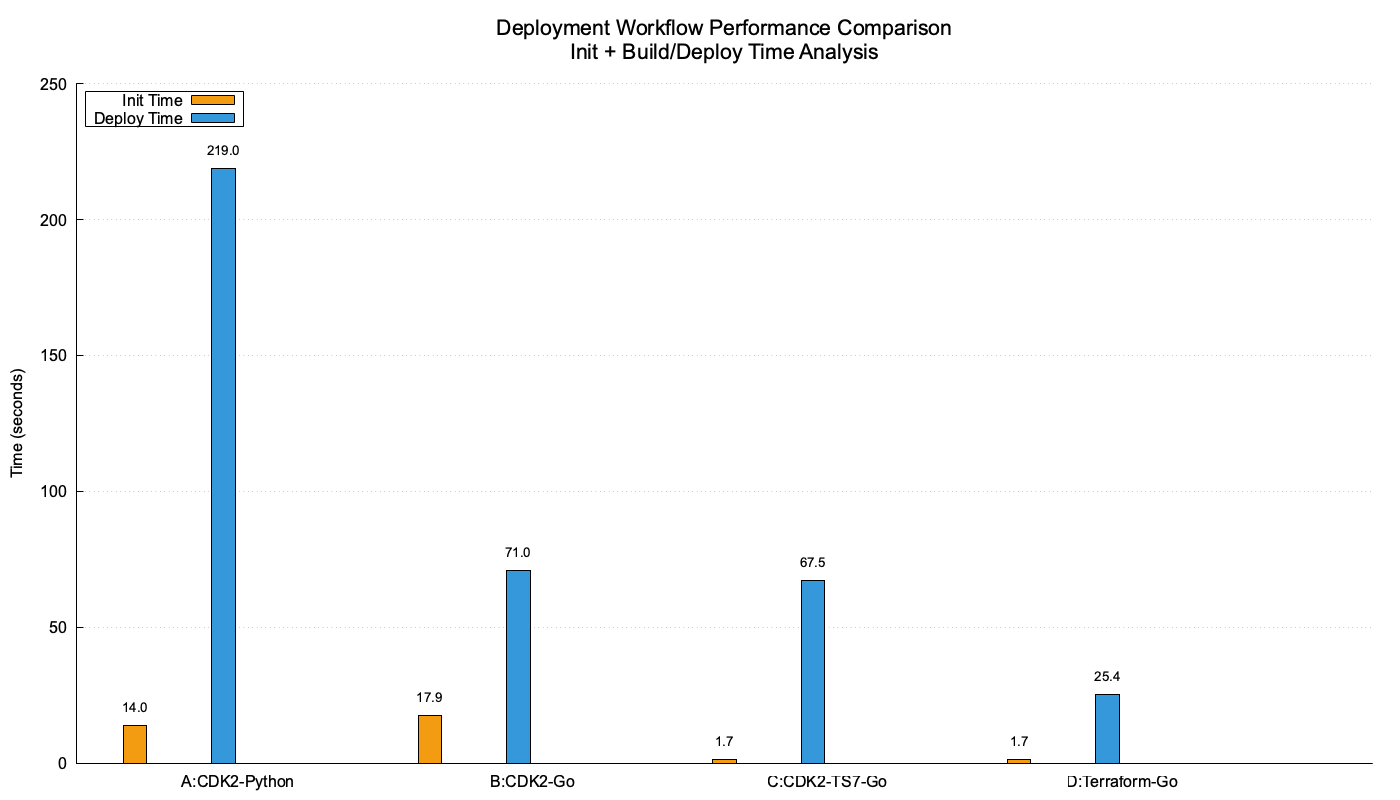
Overall remarks global cycle
- Using Go instead of Python with CDK speeds up 3x
The build environment from Python is a huge bottleneck. Using container because of the included C libraries takes time. Using Lambda Layers adds complexity, but frees you from deploying the dependencies with each Lambda Function code deploy. To get an idea about Lambda startup times (Python 3x slower than GO), read this post.
Porting an app from one language to another is supported by LLMs.
- Terraform is 2..3x faster than CDK, even with TypeScript 7
The Terraform app is faster than CDK, because it’s a GO app. Also the “generating CloudFormation” step is not necessary.
Want to switch? Porting simple infrastructure can be done quickly with LLMs. For more complex projects, this cannot be done automatically…yet.
- TypeScript 7 improves synthesis time a lot
With more complex projects, this can speed up development.
The compatibility seems to be good. So use TypeScript 7, use bun, have fun.
- bun is much faster than npm/yarn
The numbers speak for themselves: bun i completes in ~3.5 seconds compared to npm i at ~14 seconds for the same dependency set. As a drop-in replacement for npm in CDK projects, there is little reason not to switch.
Conclusion Overall development cycle
My advice: think twice!
At the beginning of a project with the help of an LLM, the “I can only choose that language or this IaC, because we only have knowledge in X” is not a constraint any more.
Keep in mind, that deployment is done 100 times or more in a project. And the ~3.5 minute difference per deploy between variant A and D does not just mean 350 extra minutes over 100 deploys — slow cycles interrupt flow and make quick iterations painful.
Local Optimization: Python deployment
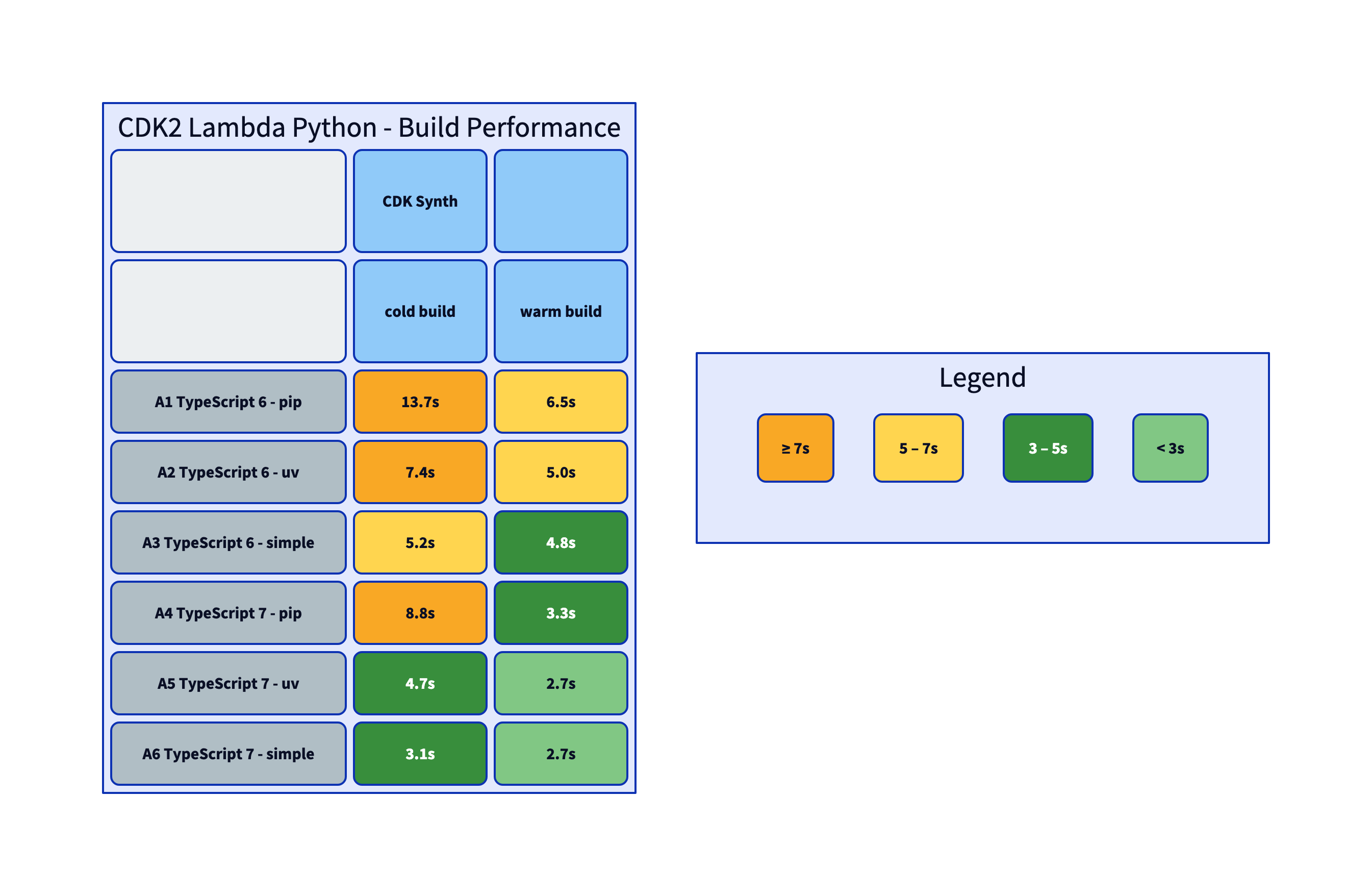
If you decide to stick with Python, here are a few tuning tips.
| Variant | CDK | Lambda packaging |
|---|---|---|
| A1 | TypeScript 6 | Python + pip |
| A2 | TypeScript 6 | Python + uv |
| A3 | TypeScript 6 | Python inline (no deps) |
| A4 | TypeScript 7 | Python + pip |
| A5 | TypeScript 7 | Python + uv |
| A6 | TypeScript 7 | Python inline (no deps) |
Python also has a faster package manager replacement written in Rust: uv. Replacing pip with uv speeds up a lot. Compare A1 to A2.
Sometimes the script is simple enough to not use any external dependencies at all. These simple scripts do not need to be packaged, you just send the Python source code to Lambda. This is also a neat trick to deploy a simple function within CloudFormation. You just include the code in the Stack. See A3.
Switching to TypeScript 7 with pip (A4) and uv (A5) gets us into the lower single digits seconds range.
The simple version A6 is the fastest one.
You can find a running example of all these options in our trick repository: serverless-standard/cdk2-lambda-python.
The benchmark-build script applies all changes.
These are also the times when you bundle all dependencies as an extra Lambda Layer. The Layer architecture is a good fit if the dependencies do not change often.
Overall conclusion
Get the right tool for the task!
Most developers have their go-to language to create small things. This makes sense, because you are fast with your favourite tool.
When you build an application, in this case with Lambda Functions, think about the time spent in development cycles and the execution speed when the applications run.
Short one-week projects - you will not gain so much switching IaC or Lambda application language.
Longer projects with many development cycles - think long term. How much time in the development cycles can you spare, how much faster are you. Compare that to the learning curve with agentic coding help.
IMHO the underlying reason, that many tools are rewritten in GO or Rust or Zig is the frustration you get from slow tooling. So thanks to the developers of those tools to make my development faster!
Changing a simple Python script which runs in the background and timing does not matter - leave it alone!
More complex applications where also cold-start matters and you have 100+ development cycles - think about using faster tooling or static compiled languages like GO.
If you need consulting to support your AWS development, your Amazon Connect Customer or GenAI project, don’t hesitate to contact us, tecRacer.
Want to learn Go on AWS? Go here
Thanks to
Foto von Belariga Design auf Unsplash
Claude for graphics and editing.