Email as a communication channel for Amazon Connect - TTT: Tips, Tools and Traceability
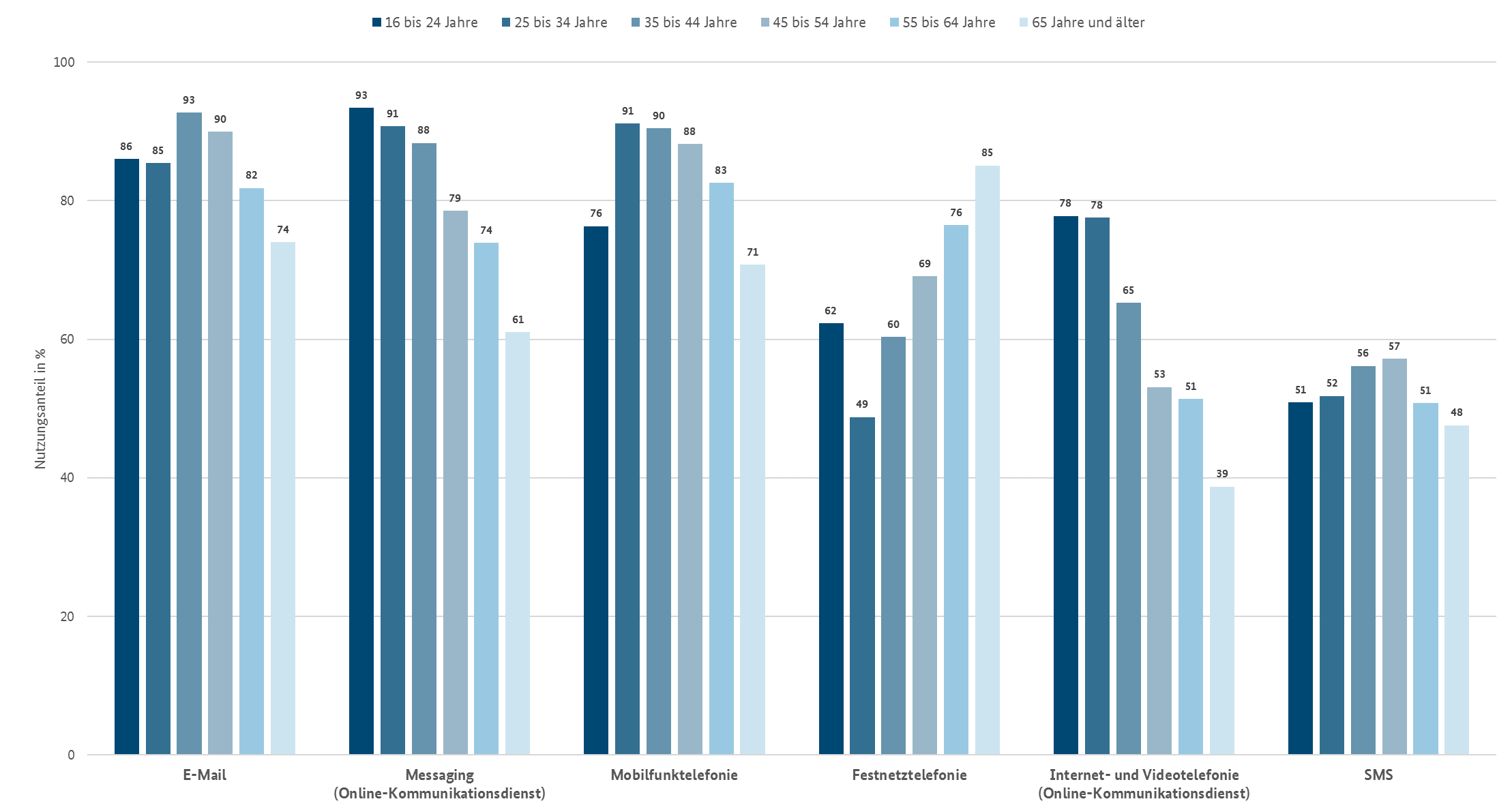
In spite of the diversity of social media communication channels, email is still the most used communication channel. According to a survey of the Bundesnetzagentur nearly as much used as messenger services. Using GenAI in combination with email communication can really boost the automation for your Amazon Connect contact center. And for the communication to work properly, many AWS services have to work together properly also. Let’s have a look at how TTT tips, tools, and traceability can help you to achieve that.
According to the “VERBRAUCHERBEFRAGUNG 2023 der Bundesnetzagentur” pdf E-Mail is still important in comparison to messaging:
 .
.
In a number of projects, we used this quite young service “E-Mail in Amazon Connect”, so we also built a few tools and established development best practices to do that.
The Path
- The mail delivery from mail client to SES mail
- Transformation to Amazon Connect contact mail routing in SES
- Incoming mail routing and Connect flow handles the mail and routes it to the contact center
- Contact handling agent or AI assistance answers the questions
1. Mail delivery
These are the types of standard protocols for a mail client to communicate with the mail server. Of course, if you use Outlook, there are several proprietary protocols.
POP3: Post Office
With the older POP3 protocol, you fetch the mails from the server, and the mails are deleted on the server.
IMAP: Internet Message Access Protocol
While POP3 just fetches the mail, IMAP supports folders and reads the mails on the server.
SMTP: Simple Mail Transfer Protocol.
This protocol is used to deliver mails. That means if you send a mail, SMTP is used.
Segments of a Mail
A simplified use case has five sections.
When you handle mails with GenAI, it is vital to know if the GenAI only has one mode, that means text; then you can ignore the images. Or you want to have a larger AI with more tokens and slower but more thorough; then you also need images.
| Part | What | Description |
|---|---|---|
| A | Metadata | How the mail is transported, some security things, etc. Housekeeping. |
| B | Header | This is what is written on the outside of the mail. That means: target, source, subject |
| C | Content | This is the payload. It used to be pure text, but now it usually is formatted HTML. |
| D | Embedded images | These are images directly shown in the mail. |
| E | Attachments | These are downloadable attachments because it used to be all text. They are coded as base 64. |
Spam example.
Let`s use SPAM for something useful here.
Overview:

A Metadata
Original Message
Message ID	<CAHv=kaPgY-p=_1nd1Bgk2531xZWXtqAnEeMohA+8tD_=p8YM3g@mail.gmail.com>
Created at:	Thu, Apr 9, 2026 at 8:45 PM (Delivered after 13 seconds)
SPF:	PASS with IP 209.85.220.41 Learn more
DKIM:	'PASS' with domain gmail.com Learn more
DMARC:	'PASS' Learn more
A part of the routing information:
Delivered-To:  me@gmail.com
Received: by 2002:a05:6a11:d895:b0:6cb:5865:a33f with SMTP id od21csp61792pxc;
        Thu, 9 Apr 2026 11:45:47 -0700 (PDT)
X-Received: by 2002:a05:690c:90:b0:79a:62a2:b3a6 with SMTP id 00721157ae682-7af7137e538mr862717b3.29.1775760347587;
        Thu, 09 Apr 2026 11:45:47 -0700 (PDT)
ARC-Seal: i=2; a=rsa-sha256; t=1775760347; cv=pass;
        d=google.com; s=arc-20240605;
        b=S...==
ARC-Message-Signature: i=2; a=rsa-sha256; c=relaxed/relaxed; d=google.com; s=arc-20240605;
        h=to:subject:message-id:date:from:in-reply-to:references:mime-version
         :dkim-signature;
        bh=...==;
        dara=google.com
ARC-Authentication-Results: i=2; mx.google.com;
       dkim=pass header.i=@gmail.com header.s=20251104 header.b=qQlwYFBN;
       arc=pass (i=1);
       spf=pass (google.com: domain of aka423423@gmail.com designates 209.85.220.41 as permitted sender) smtp.mailfrom=aka423423@gmail.com;
       dmarc=pass (p=NONE sp=QUARANTINE dis=NONE) header.from=gmail.com;
       dara=pass header.i=@gmail.com
Return-Path: <aka423423@gmail.com>
Received: from mail-sor-f41.google.com (mail-sor-f41.google.com. [209.85.220.41])
        by mx.google.com with SMTPS id 00721157ae682-7af405ca3b6sor1979697b3.2.2026.04.09.11.45.47
        for <Silberkopf@gmail.com>
        (Google Transport Security);
In the Received Parts you see from which mail server to what mail server the email was routed.
SPF, DKIM, and DMARC
This is DNS information about the mail domain. Until 2014, the MX Record was the DNS information to send and receive E-Mails. That meant you could fake any mail server. With the SPF framework, senders are also verified. SPF was introduced around 2003. In 2014 it became standard in RFC 7208.
- MX: Mail Exchange
- This record points to the receiving IP address. Without SPF the MX only showed who is allowed to receive. Anybody could send a mail for any domain!
- SPF: Sender Policy Framework
- The domain owner publishes a DNS TXT record listing which IP addresses/servers are allowed to send email on behalf of that domain. When a receiving server gets an email, it checks the sending server’s IP against the SPF record. If it doesn’t match, the email fails SPF.
- DKIM: DomainKeys Identified Mail
- The sending server cryptographically signs outgoing emails using a private key. The corresponding public key is published in DNS. The receiving server retrieves the public key and verifies the signature, confirming the email wasn’t tampered with in transit and genuinely came from that domain.
- DMARC: Domain-based Message Authentication, Reporting & Conformance
- DMARC ties SPF and DKIM together with a policy. It tells receiving servers what to do when an email fails both SPF and DKIM alignment — none (do nothing), quarantine (spam folder), or reject (drop it). It also provides a reporting mechanism so domain owners get feedback on authentication results.
B Header
From:	Maria Aka <aka423423@gmail.com>
To:	me@gmail.com
Subject:	Re:
C Content
Content-Type: multipart/alternative; boundary="000000000000ad2b1e064f0b6cf7"
--000000000000ad2b1e064f0b6cf7
Content-Type: text/plain; charset="UTF-8"
Content-Transfer-Encoding: quoted-printable
Le jeu. 9 avr. 2026, 18:16, Maria Aka <aka423423@gmail.com> a =C3=A9crit :
> Guten Abend, ich w=C3=BCrde Sie gerne kennenlernen
>
--000000000000ad2b1e064f0b6cf7
Content-Type: text/html; charset="UTF-8"
Content-Transfer-Encoding: quoted-printable
<div dir=3D"auto"></div><br><div class=3D"gmail_quote"><div dir=3D"ltr" cla=
ss=3D"gmail_attr">Le jeu. 9 avr. 2026, 18:16, Maria Aka <<a href=3D"mail=
to:aka423423@gmail.com">aka423423@gmail.com</a>> a =C3=A9crit=C2=A0:<br>=
</div><blockquote class=3D"gmail_quote" style=3D"margin:0 0 0 .8ex;border-l=
eft:1px #ccc solid;padding-left:1ex"><div dir=3D"auto"><div dir=3D"ltr">Gut=
en Abend, ich w=C3=BCrde Sie gerne kennenlernen=C2=A0<br></div></div>
</blockquote></div>
--000000000000ad2b1e064f0b6cf7--
You see that there is a short text part for the content and then a larger formatted HTML for nice, pretty printing.
D E Binary Data
--000000000000248610064936e53f
Content-Type: image/png; name="combined.png"
Content-Disposition: attachment; filename="combined.png"
Content-Transfer-Encoding: base64
X-Attachment-Id: ii_mktta9gg0
Content-ID: <ii_mktta9gg0>


--000000000000248610064936e53f--
The data itself is not shown, but believe me, it’s in the mail.
2. Mail Transformation
After the mail is received in SES, then it will be transformed to a contact. Each conversation with a customer in Amazon Connect is a contact, whether it’s voice or chat or mail. So you are not handling mails in Connect but mail contacts.
The API call to start is StartEmailContact.
I will show you that there are two ways to transform mails to contacts. With the standard embedded way, you do not have the possibility to add additional data. But if you choose to create a Lambda for yourself, you can add all the additional data to the start mail contact.
You do not need the information from the (A) Metadata to process the mail. But for analysing complex errors, this information can be useful.
"EmailMessage": {
     "MessageSourceType": "string",
     "RawMessage": {
        "Body": "string",
        "ContentType": "string",
        "Headers": {
           "string" : "string"
        },
        "Subject": "string"
     }
  },
| Part | What | Available per Method |
|---|---|---|
| A | Metadata | Lambda |
| B | Header | Lambda |
| C | Content | Direct, Lambda |
| D | Embedded images | Direct, Lambda |
| E | Attachments | Direct, Lambda |
2.1 Direct Mail Transformation
With this configuration, SES directly handles the rule to create a contact. Easy to set, up but less control over the handling.
Logging with Direct Mail Transformation
There is none.
2.2 Mail Transformation with Lambda
You can also use email transformation with Lambda with pure SES, but Mail Manager has some additional features.
Some of the Mail Manager features:
- Use a single endpoint, not the shared
inbound-smtp.eu-central-1.amazonaws.com - Logging
- Archiving
- Additional pricing, see SES pricing
In this configuration, you just store the mail with all parts A to E in S3 and then use the event to start a Lambda. The Lambda itself then calls the Start email contact.
In parts of the lambda:
Read S3 email.
obj = s3.get_object(Bucket=bucket, Key=key)
raw_email = obj["Body"].read()
msg = email.message_from_bytes(raw_email)
Start the contact.
 response = connect.start_email_contact(
            InstanceId="11111-222-333-444-5555555",
            ContactFlowId="1111-2222-3333-444-5555555",
            FromEmailAddress={"EmailAddress": from_email},
            DestinationEmailAddress=to_address_filter,
            EmailMessage={
                "MessageSourceType": "RAW",
                "RawMessage": {
                    "Subject": msg["Subject"],
                    "Body": body,
                    "ContentType": "text/plain",
                },
            },
        )
SES Mail Manager Logging
With SES only, you get no information about the email delivery. With Mail Manager, an additional feature is that you get application- and service-level logging in CloudWatch. Without log, you have no chance of debugging anything. You just see it works or not. The logging feature is really helpful. See documentation for additional information.
3. Incoming Contact routing
Now the mail is a mail contact. To get the content and additional information of the mail, you could go directly to S3 and search the data. Or you can use the new block Get stored content.
| Part | What | Description |
|---|---|---|
| A | Start log | Set logging behavior. Always activate it at the beginning of the flow; otherwise, you are flying blind. |
| B | Auto reply | If needed. Send Message |
| C | Intent Resolution | Can be done with Lex with intent recognition or just with GenAI for intent resolution. AWS Lambda function |
| D | Set knowledge base. | Attach a knowledge base with the context. Connect assistant |
| E | Set queue. | With the intent resolution, you find the queue which is suitable for the content and then you set the queue. Set working queue. Afterwards you use the Transfer to queue block. |
4. Contact handling
As the knowledge base is configured, the human agent gets a suggestion how to handle the mail, how to answer it. The quality of the suggestion depends on the model used, but the main dependency is the quality of the documents in the knowledge base.
An incoming mail is set to a queue, just like a voice or chat. The agent also receives a notification, the audible ringtone, when a mail arrives. If an agent then accepts the mail, the agent assist is triggered, gives you a summary, searches a knowledge base, and gives you a suggestion.
You could use that answer or craft one for yourself.
Identifying customers.
When the emails of your customers are set into the customer profiles, you can easily pop up the customer which has the current mail communication.
Identifying Cases
There is no embedded way to automatically attach emails with cases, but there are several ways to do it on your own. With each outgoing mail, you have to send an identifier, either in the subject or in the attributes, and with the incoming Flow or the mail Lambda, you can identify this and call the attached case.
Using Agent assist
Currently, the agent assist uses text only. That means it’s not multi-modal GenAI. So embedded images and attachments are not used. But the embedded images are treated as text, and that can lead to an overflow of the token maximum. The workaround for this is using the Lambda invoke method. Alternatively, use a larger model (which is more expensive) or just live with it.
| Part | What | Available per Method |
|---|---|---|
| A | Metadata | Not available |
| B | Header | Not available |
| C | Content | Available |
| D | Embedded images | Large embedded images lead to an error with smaller models. |
| E | Attachments | Not available |
Tips
Use Mailmanager
The advanced login capabilities give you more insight into what’s going on.
Change Quotas
The quota “Amazon Connect -Concurrent active emails per instance” should be increased. In some cases there has been the error, that otherwise you get an error about to many concurrent emails.
Use Mail Transformation with Lambda
If you need more control about the mail contact in Amazon connect, use this method.
Tools
imap-s3
Proof of concept of a mail server which you can directly use with S3
SES - DNS Check
Check whether the DNS entries necessary for SES are done.
Send Demo Mails
Scripted sending a mail with a Google Mail account.
Lambda Tail
CLI CloudWatch log tail with Lambda features.
Color Lambda framing events
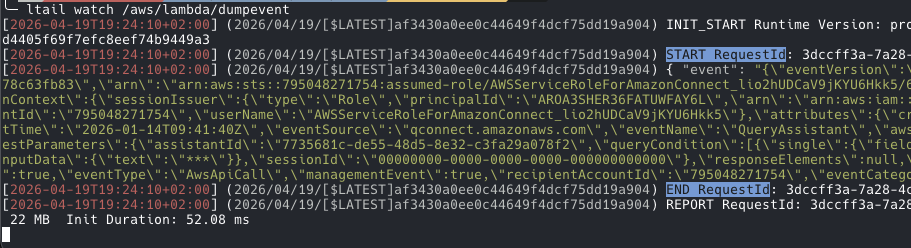
So you can see clearly where a call starts and ends.
ltail watch /aws/lambda/dumpevent
Shorten long lines

ltail watch -s /aws/lambda/dumpevent
Watch 2 logs at the same time
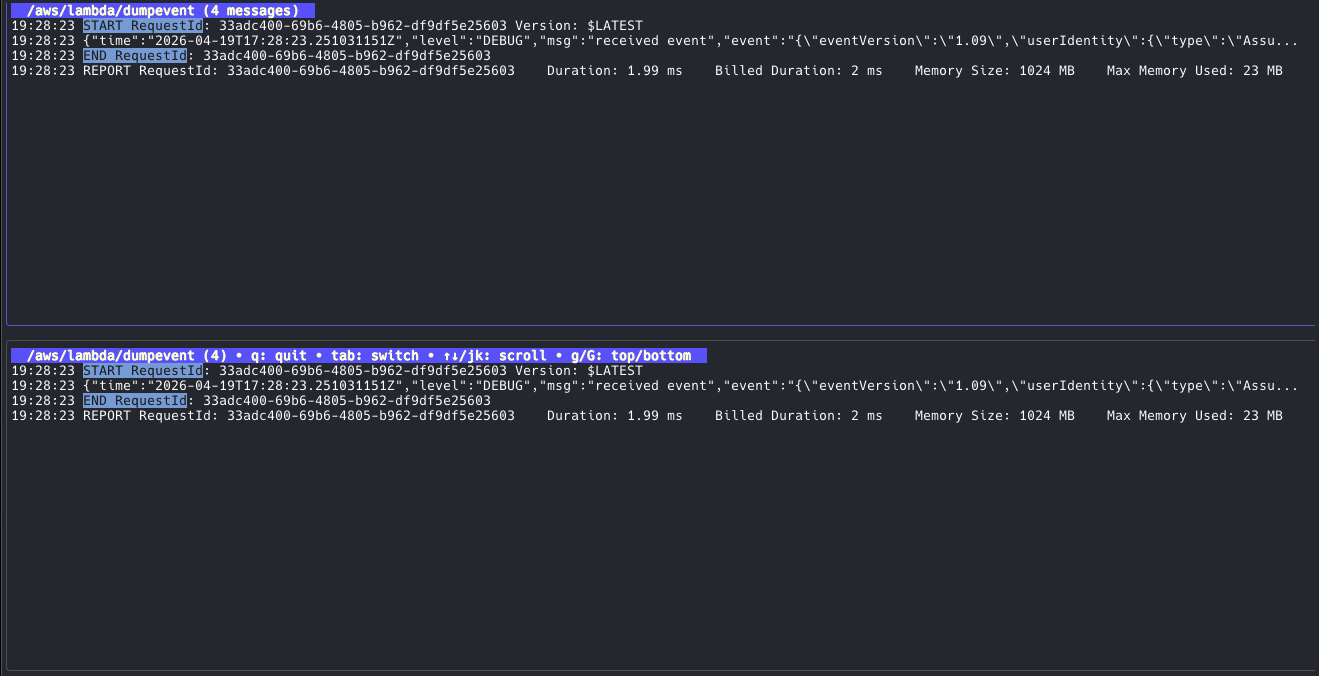
ltail dual /aws/lambda/dumpevent /aws/lambda/dumpevent
Traceability
The send demo mail app generates a unique ID in the mail subject. That way you can identify each mail. When you e.g. test a intent regognition to steer a mail to a certain channel, you want each mail to have an unique identifier.
Summary
The first setup for getting emails to work with Connect is not simple. That is because the usual building blocks are AWS services, and you have to tie them together.
The advantage of this method is that you rely on really proven services, so SES is like bulletproof. The part of the mail inside Connect has gone through some changes in the last months, and there will be additional changes. With this type of event-driven service wiring, you have potential for automation. And that means this is potential for cost saving, so I would definitely suggest adding the email channel to your contact center.
If you need consulting to support your next Connect or GenAI project, don’t hesitate to contact us, tecRacer.
Want to learn GO on AWS? GO here
Disclaimer
This article was partly supported by AI.
Thanks
Foto by Nikolay Loubet auf Unsplash