My Mailbox bucket: Building an IMAP Server for Amazon SES Mailmanager
The Mailbox challenge:
Amazon SES, the simple Email Service, has no mailboxes. What if you want to use it as a mail server and just have a mailbox? Just Build an IMAP Server - Here’s How.
You need a server that supports IMAP (or POP3) and can read objects from S3. Then, you configure SES or SES Mail Manager to store incoming emails in S3.
SES or Mailmanager?
MailManager is the more modern approach. You get a specific endpoint just for you. And there are some other possibilities. But for this approach, the endpoint is the only difference. That also means that for the Mailmanager Endpoint, you will be charged 50€ per month currently. If you use SES alone, there are no additional costs.
But you share the endpoint with all customers in that region.
Endpoint: inbound-smtp.region.amazonaws.com
With MailManager the endpoint looks like this:
Endpoint: 890123abcdef.ghijk.mail-manager-smtp.amazonaws.com
Each endpoint can have different rule sets and traffic policies. Refer to Mailmanager Ingress Endpoint for details.
To test the new service, we will use MailManager.
MailManager configuration to store mails in S3
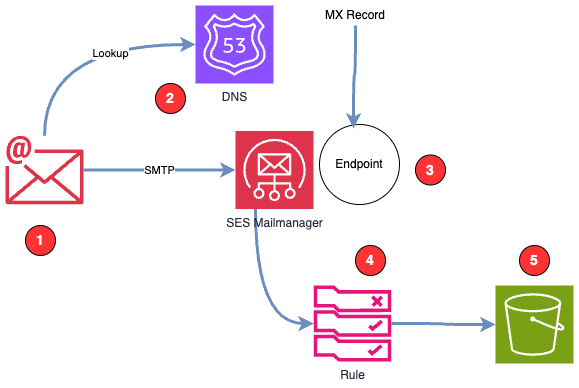
1. When an email is sent, the sender looks into the DNS entry for the domain. The corresponding entry is the MX record. The MX record points to the Mailmanager endpoint. You can have multiple MX entries with a priority number to achieve redundancy. However, since SES is HA in itself, you only need one MX entry.
Example R53 entry:
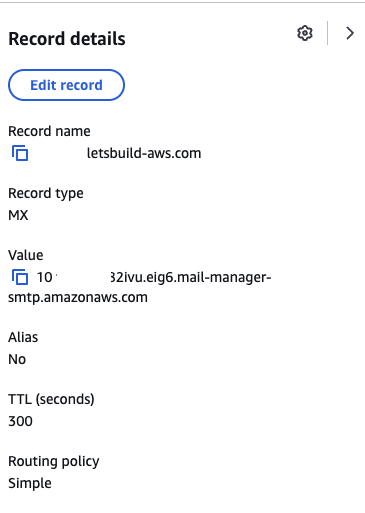
2. The MX record connects your domain with the Mailmanager endpoint.
3. The endpoint receives the mail, and the rules are executed.
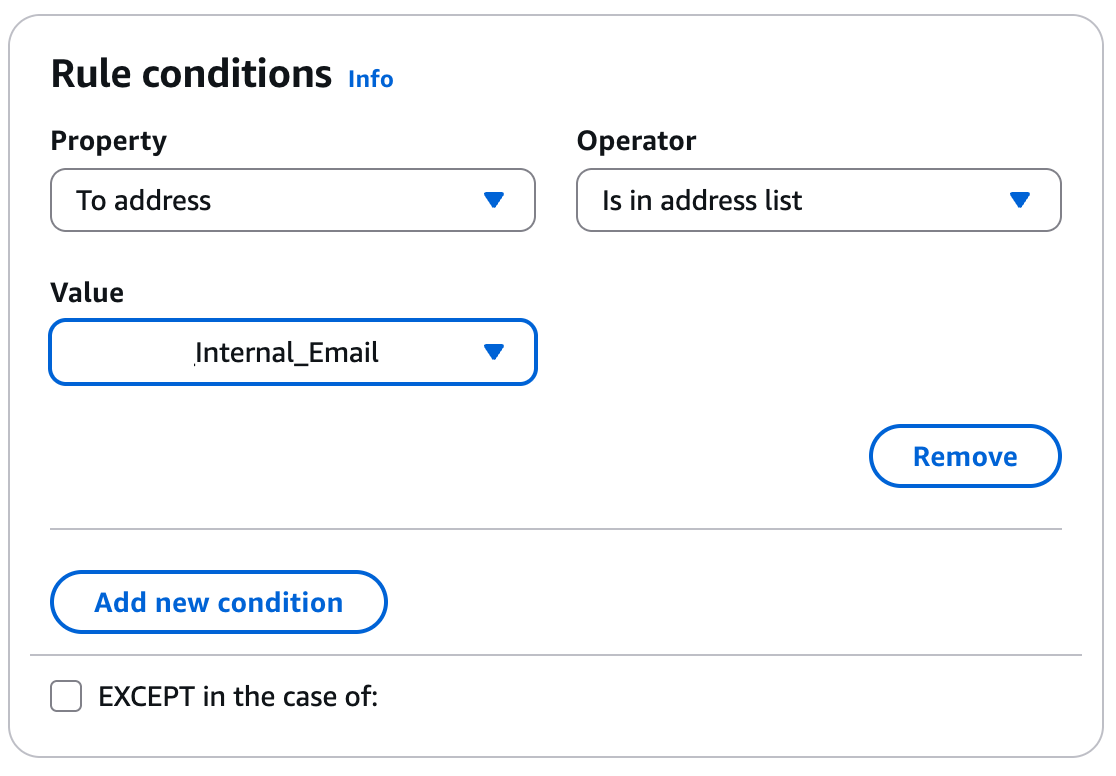
4. You specify whether all emails, only one address, or a list of addresses should be stored in S3. MailManager has its own list management.
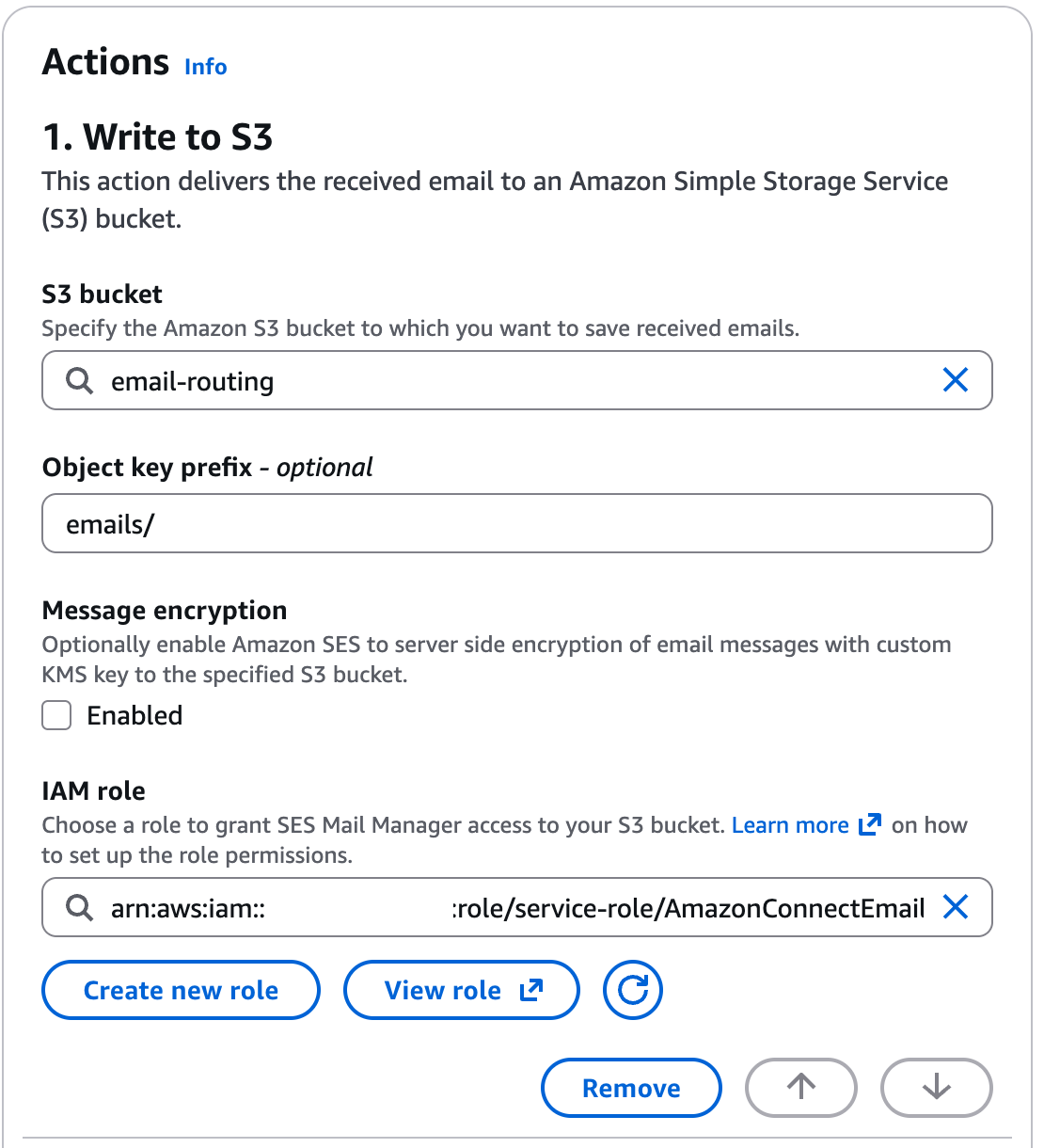
5. The Email is now stored in its raw form, also known as “eml” or “mbox” format.
A rule to catch addresses from a list
Next step is to tell MM what to do with that emails.
A rule to store in S3
And now?
You could use an S3 event to call a Lambda function and distribute the mails.
What we want to have is a “normal” IMAP Mailbox.
An IMAP Client
We use Thunderbird as an IMAP client. For a test, we will run the IMAP server locally.
So the Mail Server has the network adress of localhost 127.0.0.1.
We also need a user and a password. Then we are good to go.
The IMAP Server
The code is stored publically on GitHub. I show you a walk through.
Demo Time
 git clone git@github.com:megaproaktiv/imap-s3.git
 cd imap-s3
configure
cp .env.example .env
vi .env
set -a && source .env && set +a
Example for configuration:
# S3 Configuration
S3_BUCKET=email-routing-storage

# IMAP Server Configuration
IMAP_ADDR=:1143
IMAP_USERNAME=user@localhost
IMAP_PASSWORD=Di7aeShe

LOG_LEVEL=DEBUG
# AWS Credentials (optional - can also use ~/.aws/credentials or IAM role)
# AWS_ACCESS_KEY_ID=your-access-key
# AWS_SECRET_ACCESS_KEY=your-secret-key
# AWS_REGION=us-east-1
Get Credentials
assume letsbuild
aws sts get-caller-identity
The output from get-caller-identity just shows that you have credentials.
Example output:
{
    "UserId": "AROA******TPQO:****@googlemail.com",
    "Account": "**********",
    "Arn": "arn:aws:sts::******:assumed-role/AWSReservedSSO_AWSAdministratorAccess_06bce89b756ecaec/***@googlemail.com"
}
Start the IMAP Server
task run
Example output:
time=2025-11-12T14:20:34.785+01:00 level=INFO msg="Starting IMAP-S3 server" log_level=DEBUG
time=2025-11-12T14:20:34.786+01:00 level=DEBUG msg="Configuration loaded" s3_bucket=my-email-bucket
time=2025-11-12T14:20:34.786+01:00 level=DEBUG msg="IMAP address configured" address=:1143
time=2025-11-12T14:20:34.786+01:00 level=DEBUG msg="IMAP username configured" username=user@example.com
time=2025-11-12T14:20:34.786+01:00 level=DEBUG msg="IMAP password configured"
time=2025-11-12T14:20:34.786+01:00 level=DEBUG msg="Loading AWS configuration"
time=2025-11-12T14:20:34.786+01:00 level=INFO msg="AWS configuration loaded successfully"
time=2025-11-12T14:20:34.786+01:00 level=DEBUG msg="S3 client created"
time=2025-11-12T14:20:34.786+01:00 level=DEBUG msg="Creating S3 storage instance" bucket=my-email-bucket
time=2025-11-12T14:20:34.786+01:00 level=DEBUG msg="S3 storage initialized"
time=2025-11-12T14:20:34.786+01:00 level=DEBUG msg="Creating new S3 backend"
time=2025-11-12T14:20:34.786+01:00 level=DEBUG msg="User added to backend" username=user@example.com
time=2025-11-12T14:20:34.786+01:00 level=INFO msg="IMAP backend created" users_count=1
time=2025-11-12T14:20:34.787+01:00 level=DEBUG msg="IMAP server instance created"
time=2025-11-12T14:20:34.787+01:00 level=INFO msg="IMAP server started" address=:1143 s3_bucket=my-email-bucket username=user@example.com
time=2025-11-12T14:20:34.787+01:00 level=DEBUG msg="Starting to serve IMAP connections"
Install IMAP client
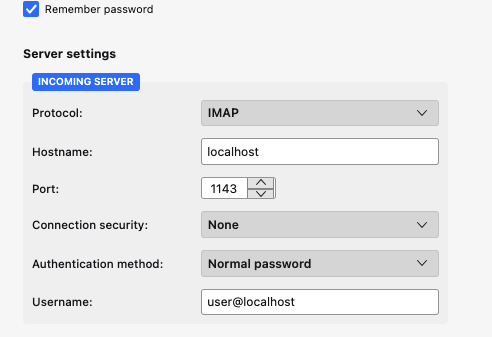
Example: `https://www.thunderbird.net/ Now you configure the IMAP client with the following settings:
- Server:
localhost - Port:
1143 - Username:
user««< from .env IMAP_USERNAME - Password:
your-password««< from .env IMAP_PASSWORD
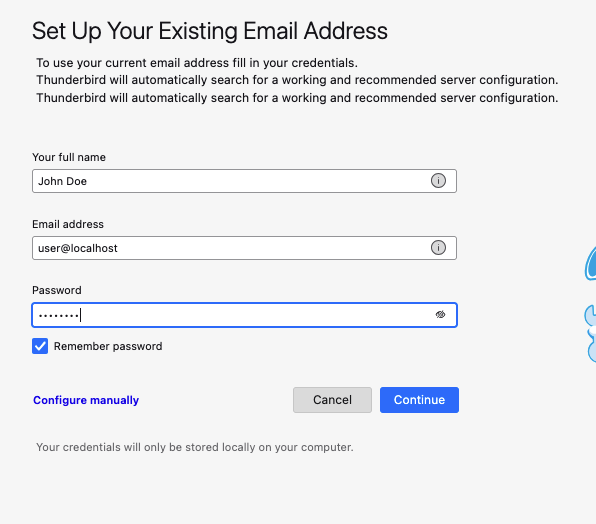
And with the server settings:ss
Correct login
time=2025-11-12T14:30:09.533+01:00 level=DEBUG msg="New IMAP session created"
time=2025-11-12T14:30:09.534+01:00 level=DEBUG msg="Creating new server session"
time=2025-11-12T14:30:09.539+01:00 level=DEBUG msg="Login attempt" username=user
time=2025-11-12T14:30:09.539+01:00 level=INFO msg="User logged in successfully" username=user
And if you want to learn about IMAP Protocol
Now, Files from the S3 Bucket are listed:
time=2025-11-12T14:33:00.542+01:00 level=DEBUG msg="Selecting mailbox" mailbox=INBOX username=user
time=2025-11-12T14:33:00.542+01:00 level=DEBUG msg="Listing emails from S3" bucket=email-routing-storage prefix=emails/
time=2025-11-12T14:33:00.542+01:00 level=DEBUG msg="Processing S3 page" page=1 bucket=email-routing-storage
time=2025-11-12T14:33:00.701+01:00 level=DEBUG msg="Length of objectname" object=40
...
Note: If you change the configuration, you have to re-export the ENV variables.
set -a && source .env && set +a
task run
Each mailfile is processed by the IMAP server.
time=2025-11-12T14:33:11.030+01:00 level=DEBUG msg="Getting email from S3" bucket=email-routing-storage key=emails/vpfu59f679fie1r118gost8hfqfjj7ba4mt2o4g1
time=2025-11-12T14:33:11.069+01:00 level=DEBUG msg="Email retrieved successfully" bucket=email-routing-storage key=emails/vpfu59f679fie1r118gost8hfqfjj7ba4mt2o4g1
time=2025-11-12T14:33:11.069+01:00 level=DEBUG msg="Email content read" email_key=emails/vpfu59f679fie1r118gost8hfqfjj7ba4mt2o4g1 size_bytes=4454 username=user
time=2025-11-12T14:33:11.069+01:00 level=INFO msg="Fetch completed" fetched_count=11 username=user
time=2025-11-12T14:33:11.077+01:00 level=DEBUG msg="Fetching messages" mailbox=INBOX username=user total_emails=74
time=2025-11-12T14:33:11.077+01:00 level=DEBUG msg="Fetching email" email_key=emails/90c865brmh2l1tkdkv974v00nhevmes7a680ce01 seq_num=20 username=user
On the S3 bucket you see the files:
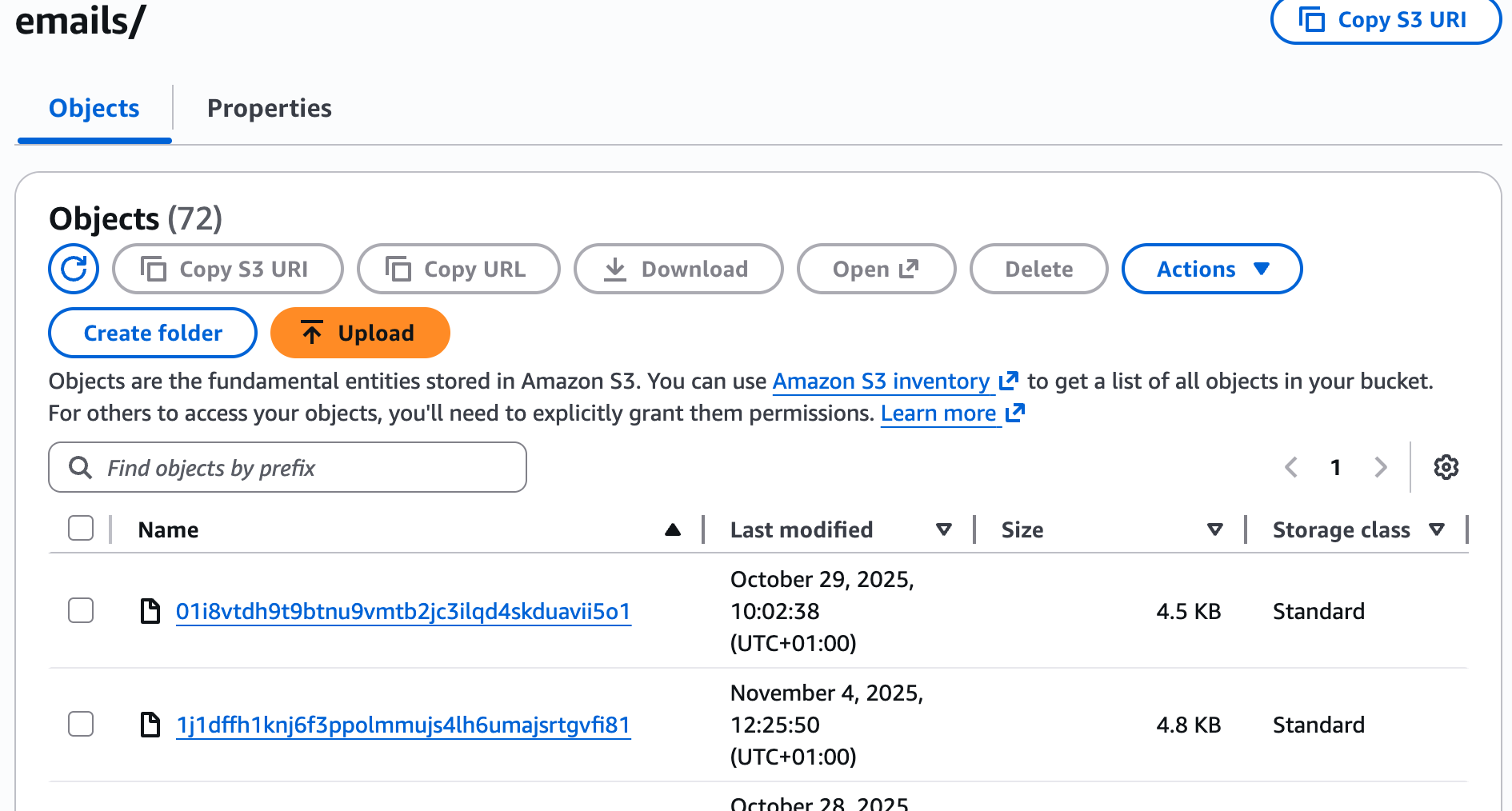
Now your IMAP Client shows all the emails in the INBOX mailbox.
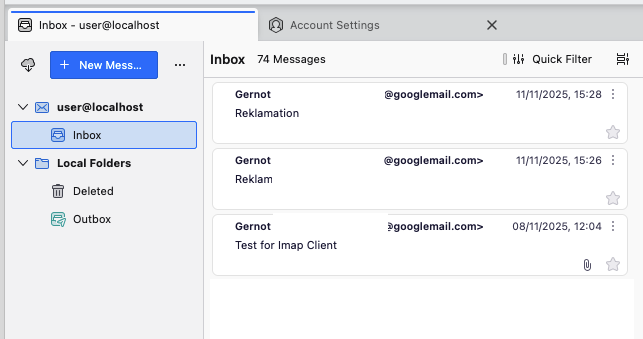
Example of a mailfile:
Received-SPF: pass (spfCheck: domain of _spf.google.com designates 209.85.161.48 as permitted sender) client-ip=209.85.161.48; envelope-from=silberkopf@gmail.com; helo=mail-oo1-f48.google.com;
Authentication-Results: amazonses.com;
 spf=pass (spfCheck: domain of _spf.google.com designates 209.85.161.48 as permitted sender) client-ip=209.85.161.48; envelope-from=silberkopf@gmail.com; helo=mail-oo1-f48.google.com;
 dkim=pass header.i=@googlemail.com;
 dmarc=pass header.from=googlemail.com;
Return-Path: <*****@gmail.com>
Received: from mail-oo1-f48.google.com (mail-oo1-f48.google.com [209.85.161.48])
 by open.mail-manager-smtp.eu-central-1.amazonaws.com with ESMTPS id 56kg8j4dgkrhv0m8oou9vv66u89ramdhd4295b01
 (version=TLSv1.3 cipher=TLS_AES_256_GCM_SHA384)
 for <guru@contact.letsbuild-aws.com>; Sat, 08 Nov 2025 11:04:40 +0000 (UTC)
Received: by mail-oo1-f48.google.com with SMTP id 006d021491bc7-656c665749bso638532eaf.3
        for <guru@contact.letsbuild-aws.com>; Sat, 08 Nov 2025 03:04:40 -0800 (PST)
DKIM-Signature: v=1; a=rsa-sha256; c=relaxed/relaxed;
        d=googlemail.com; s=20230601; t=1762599879; x=1763204679; darn=contact.letsbuild-aws.com;
        h=to:subject:message-id:date:from:mime-version:from:to:cc:subject
         :date:message-id:reply-to;
        bh=Y0UCRRALZC9nlMeYzFkt8sXZlw/jGKZqbH4ASf98ta0=;
        b=DDWVD9zdn9dpas3Ya9yrA8Q0FGD9TdLpwpDNGLXdZwZhdpNevtxyCYS55Pss2rJDgk
         TdChbxcNyusqYWdXyZeMn9grAY2+XXMSLtGX6ozLpqFuxQqG91sZDXrYoGz85FzHUdiU
         JYetZNKmRaQXBvs6dV9g/dpAlquZCWqPOFN/BTgN+OtqAVIifEb2nKDFZmHkyW5WM4Hj
         HyjdVp9rNIcKKPM4TdSWEFp+iYrN1gInd4OP5VWRGtFaOLhh1BapGD+xw4w/he0M/e8s
         eiVUOj1icqZ9eBN6pDj/lk08+3qyioSV8YeLzZNFD4FUWVLGjWfS5KtLfSGIzjxeqlI9
         HupA==
X-Google-DKIM-Signature: v=1; a=rsa-sha256; c=relaxed/relaxed;
        d=1e100.net; s=20230601; t=1762599879; x=1763204679;
        h=to:subject:message-id:date:from:mime-version:x-gm-gg
         :x-gm-message-state:from:to:cc:subject:date:message-id:reply-to;
        bh=Y0UCRRALZC9nlMeYzFkt8sXZlw/jGKZqbH4ASf98ta0=;
        b=m7CF5DnKUx6z4gdRZw7iNzRa4g8OPlN7AS4UwcuJQYLO12YTlVxZrifDEUF0sN0Z6R
         A4dg3zZs4IY7tHliI5vPsUZ//O0fWLAij0b9IA7Bo1yFdfpVQXMt0yyfnAteL0U9R2Il
         tP+jPA3W+FgGZm4b7u69fqIlI/TPetl7Jhf4TlNk2jokE/ms5AYiHdwxo5N7wmsxX/Fm
         hU7xEE+JIS1hoGaejaGy7Q0R28zML1xE2VS143zO5GJgdAVlww+lI7YBkp2GUva95+Gx
         ImBEvTCBcqhHeRkp22f+My745PQEB3K8FcEOSHFcLqx8OPyt1m8UQY/KaAAkYIbPB1S0
         SmMg==
X-Gm-Message-State: AOJu0Yzijm+DJti2T1ybjR8x/yAhftNz2trLMQW62a+g249HjyCmezyT
	DRsoPa2O4O7S5jx91UOuLmPpBmmBvE4nXJA2uvmAavOap2f/v0GIjtkZrGmPSHj1K5CE4O6oH+s
	07R+vTSgNLbvsHKRp+/s/G77vYZqw6EkRMBY6
X-Gm-Gg: ASbGncvhEeQaeNKrMIuSgNjH0PiDadLscFRnDqMhM0RZPPWjYTu1nJ1UBNaKNgudDjD
	yCqQsA/QBRVGchGLyPObe+pls4bj25nPTjYNHGsSml5MWEGVw6TIGfDg5kn5fe84+zTkEvKXBw+
	g0y7T3JbKpzQHE25A6bBbO62IAmlTDvR9laJ5Yi3iQFbnda6yPdic5NBbGDLjuE+9/h6Z3E12Lz
	uTXBD2+avuK5tBa5m0Np1V9pISp7dS4dW4Y5vX3rHeaLmoFTZWESOaTuvy45tuU5TJPZwMLkM0+
	8OeX/hgkMOch7SZUxeFjc9G+rM4L544B1xomPNohjay+V/xRSw==
X-Google-Smtp-Source: AGHT+IE7kFFJwB3ovEcEp5HyJFYnSweAAWA50SiOO1kSBpHXE5DndBHuDbaTMzf1tctYXE1SwmWKryIK0kA2AilWLmo=
X-Received: by 2002:a05:6808:2f0e:b0:441:8f74:f0b with SMTP id
 5614622812f47-4502a4d33b1mr1076815b6e.53.1762599878616; Sat, 08 Nov 2025
 03:04:38 -0800 (PST)
MIME-Version: 1.0
From: Gernot Glawe <***@googlemail.com>
Date: Sat, 8 Nov 2025 12:04:25 +0100
X-Gm-Features: AWmQ_blxDr2LdCLsEAM2cZxfHu5PR_uuf4jORjNcTBLvKTeuHnKPRrmsrSW9MkM
Message-ID: <CAJP8DAU7xyPCoVWmr44N0cTjYHa45tWLrYZoVP48R6yvOzhE_w@mail.gmail.com>
Subject: Test for Imap Client
To: Your friendly builder <guru@contact.letsbuild-aws.com>
Content-Type: multipart/mixed; boundary="000000000000a57fba064313430c"

--000000000000a57fba064313430c
Content-Type: multipart/alternative; boundary="000000000000a57fb9064313430a"

--000000000000a57fb9064313430a
Content-Type: text/plain; charset="UTF-8"

Hello,

this is a test!


Best, John Doe

--000000000000a57fb9064313430a
Content-Type: text/html; charset="UTF-8"

<div dir="ltr"><div>Hello,</div><div><br></div><div>this is a test!</div><div><br></div><div><br></div><div>Best, John Doe</div></div>

--000000000000a57fb9064313430a--
--000000000000a57fba064313430c
Content-Type: image/jpeg; name="shiftcx.jpg"
Content-Disposition: attachment; filename="shiftcx.jpg"
Content-Transfer-Encoding: base64
Content-ID: <f_mhq6g3lw0>
X-Attachment-Id: f_mhq6g3lw0

/9j/4AAQSkZJRgABAQAASABIAAD/4QCMRXhpZgAATU0AKgAAAAgABQESAAMAAAABAAEAAAEaAAUA
AAABAAAASgEbAAUAAAABAAAAUgEoAAMAAAABAAIAAIdpAAQAAAABAAAAWgAAAAAAAABIAAAAAQAA
... more lines
ejXdmVzgVjm3OTxXa3QGTWKwG4/WvpJR1PITP//Z
--000000000000a57fba064313430c--
The Code
The running server is at Code
You see these files:
├── go.mod
├── go.sum
├── imap-s3-server
├── LICENSE
├── main
│   └── main.go
├── README.md
├── server
│   ├── backend_test.go
│   └── backend.go
├── storage
│   ├── s3_test.go
│   └── s3.go
├── Taskfile.yml
└── testdata
    └── 56kg8j4dgkrhv0m8oou9vv66u89ramdhd4295b01
| Package | task |
|---|---|
| main | Starting and configuring |
| server | Imap Server functionality |
| storage | S3 Storage functionality |
The flow of events is as follows:
- Startup Flow: main() → AWS config → S3 client → storage layer → IMAP backend → server start
- Authentication Flow: Client connects → NewSession() → Login() → UserSession created
- Mailbox Operations: Select() → ListEmails() → S3 API calls → Mailbox creation
- Message Fetching: Fetch() → GetEmail() → S3 GetObject() → email parsing → IMAP response
- Search/List: Various IMAP commands → ListEmails() → S3 pagination → results
Feel free to deep dive into the code.
Deleting
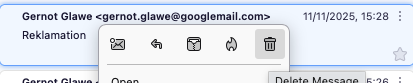
To delete an email, you configure the IMAP client real delete the file in the S3 bucket. The changes will take effect after a restart of the client.
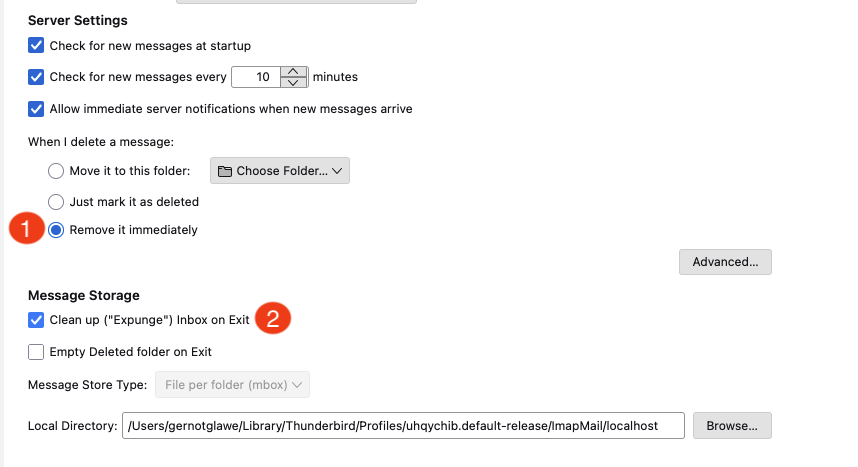
Now, if you delete a message, it will be removed from the S3 bucket.
How complex is it to create such a server?
Yes, the code was created during 3 hour vibe session. So it really does not take weeks…
Summary
This is not a production-ready solution. It is a proof of concept and should not be used in production environments.
A few things that are missing:
- Encrypted password
- Multi user
- …
But because the server itself is a single GO binary, its easy to create a Docker image and deploy it to a server. Or use a single, small EC2 instance.
So if you want to use SES in general, but you are lacking a solution to just read mails with a mail client, this could be a good starting point.
If you need developers and consulting to support your decision in your next GenAI project, don’t hesitate to contact us, tecRacer.
Want to learn GO on AWS? GO here
Enjoy building!