Price estimation and optimization strategies for Amazon Connect Customer Contact Center
There are different methodologies for estimating and optimizing pricing in AWS. You pay for what you use, and if you use too much, you pay too much.
The usage and the price especially for our Amazon Connect Customer projects differs with changing processes and technical architecture decisions. To adress that challenge, we have developed a flow-based estimation strategy, which we use in our discussions with customers to find the best solution.
This tool provides the transparency you need to choose between different architectures based on their features and costs. We’ll show you a real-world example in which we reduced technical costs by 11%. This was only possible thanks to the transparency gained by comparing different approaches.
Price estimation strategies
The three different strategies we are looking at are:
- After the fact
- Estimate per volume
- Flow-based
After the fact
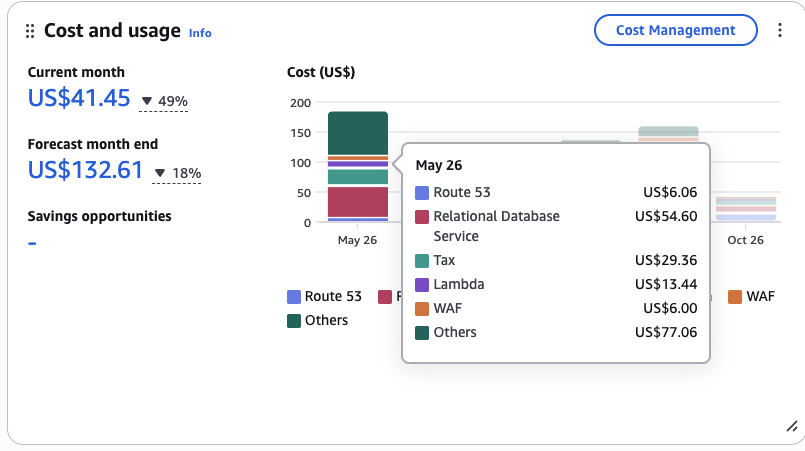
You have a rough idea of what your budget is, what resources you are using, and think that’s not too much, and just wait.
Sometimes this is an intelligent solution because estimation is an assumption. If you have a development environment where the real work is done, you have a better guess and estimate of what the prices will be.
And you have to know the prices to see whether it’s worth optimizing.
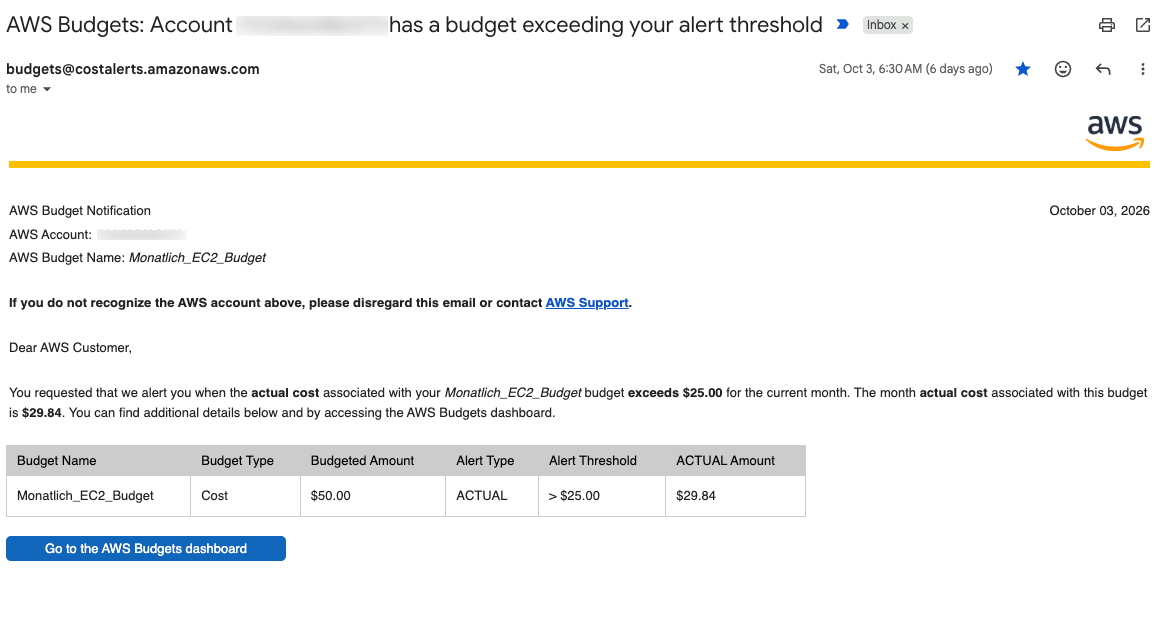
Note: You should always, I repeat, always create a budget plan and have an alert if pricing is exceeded. You will get mails like these:
Estimate per volume
The AWS Pricing Calculator Link is a good starting point for an estimation.
If you want to get really into the details, that’s the place to go.
Problem with Amazon Connect Customer projects:
The Amazon Connect Customer services are currently not included in the pricing calculator.
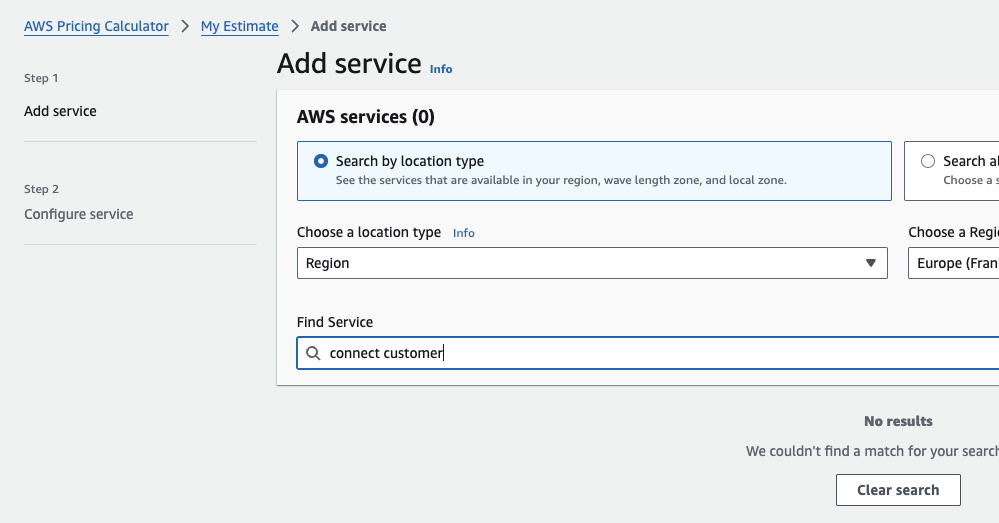
So you need different sources.
One Excel to not rule them all
So, usually, for Amazon Connect customer price estimates, there’s an extra Excel file which tries to include all the different prices of the different services. What you get is one price estimation. If you want to compare it, you have to have several Excel spreadsheets. What it does not show is how the flow, your architecture decisions, and your process decision affect the pricing.
We use a flow-based strategy to overcome these limitations.
Optimize with flow
To estimate the cost of an Amazon Connect customer contact center, you have to estimate the dynamic routing flow. That means you can’t have just the static AWS resources like an S3 Bucket. Voice is paid per minute, case is paid per case, and so on. The difference is that storage on an S3 bucket is paid monthly, based just on the storage volume.
There are various Excel solutions which try to give an overview and an estimation of the complex pricing. But to have a clearer view, we introduced the flow-based pricing. Our solution for that is called: Amazon Connect Customer Pricing Estimation Playground
Start with voice
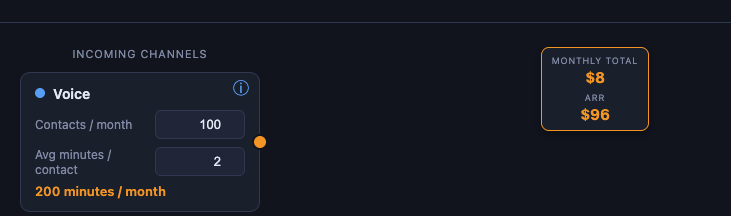
Let’s assume that you have 100 contacts per month and talk 2 minutes per contact. The result is 200 minutes per month. At a voice rate of $0.038 per minute, that is 200 × $0.038 = $7.60, roughly $8 per month.
Also there are the DID provider costs which are typically $0.0022 per minute. Both are shown as a sum in the overview of the voice card. A detailed summary at the bottom shows both, including voice recording storage.
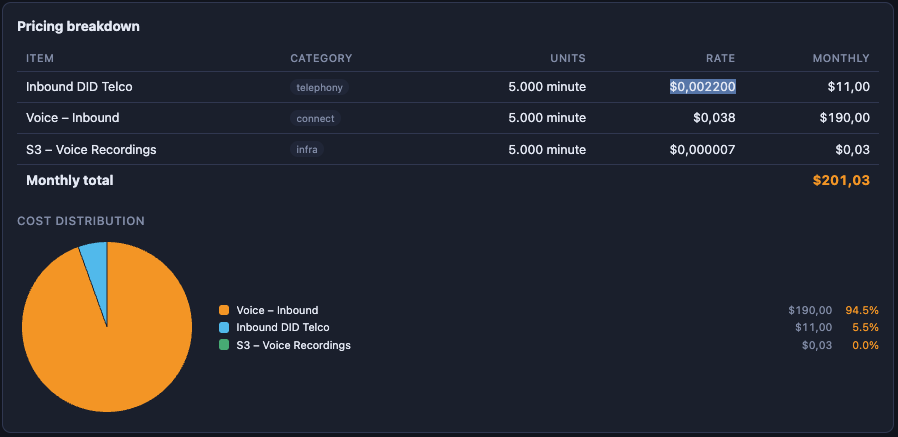
See the Pricing page for more details.
Now you decide for which requests from the customer you want to create a case. Cases are for documenting that the request of the customer is handled. But if a customer calls the second time regarding the same issue, you just have to create one case.
We have to know how often the customer calls for the same issue. We assume that about 25% of calls are 2nd contacts for an already-documented issue, so a case is created for only 75% of calls (75 cases per 100 contacts).
Connect Voice to cases:
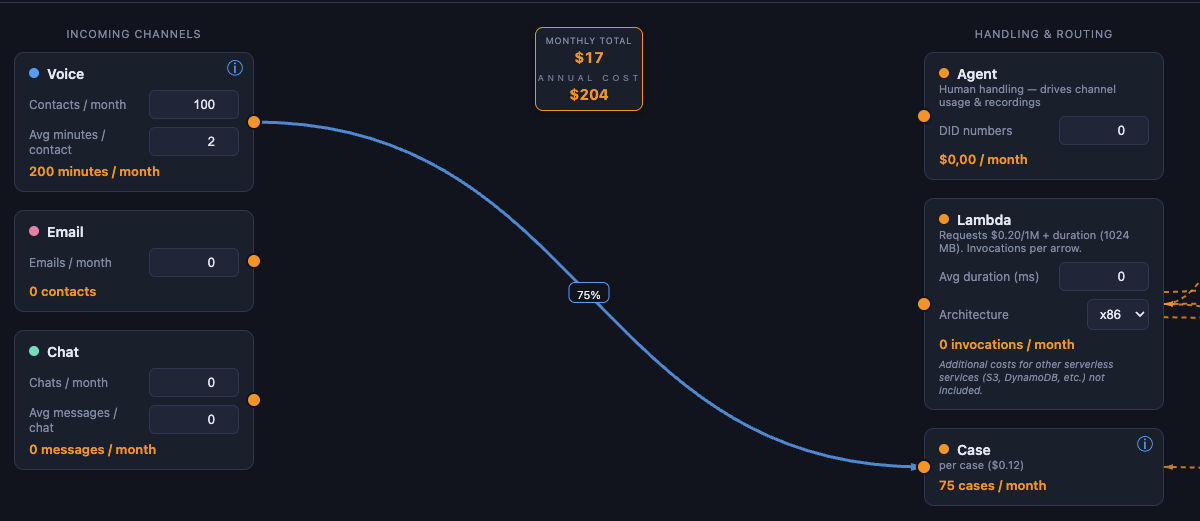
Adding cases: 75 cases per month at $0.12 per case = $9. Together with the $8 voice cost, the resulting monthly price is $17.
Optimize Example
With a clever architecture and automation, you can deflect requests from the customer or automate it via AI.
We will show you two optimized examples: one with email automation and one with AI.
Base setup
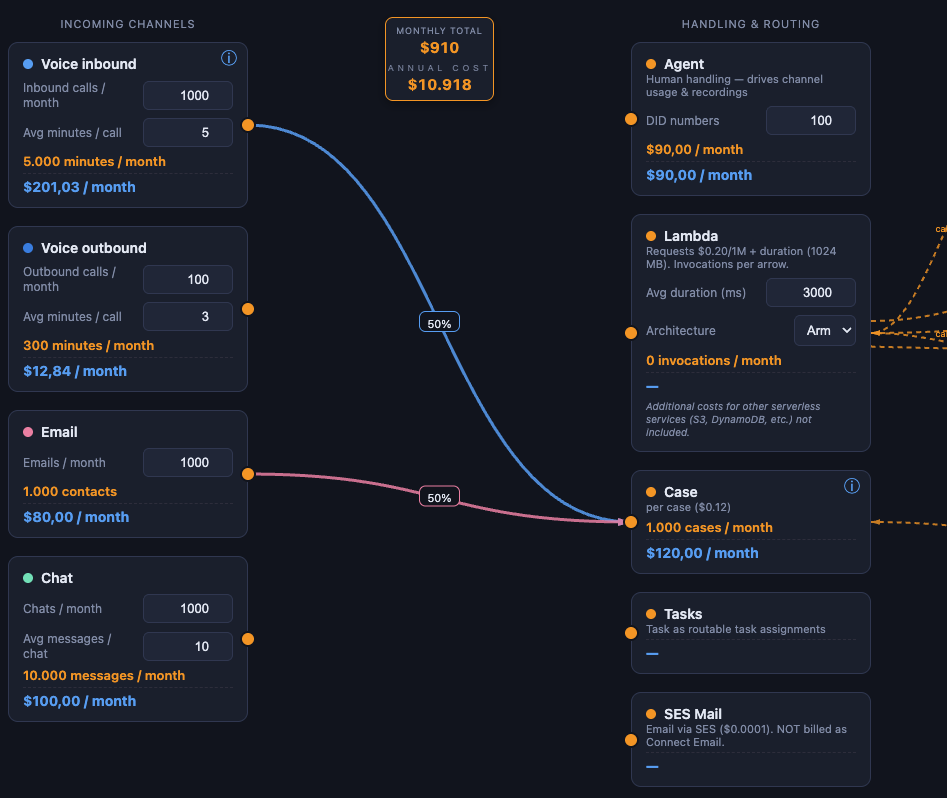
In this example, you see we have 1,000 inbound calls per month and 1,000 emails. From existing knowledge about the processes, we know that, on average, we have a case for half the contacts.
Starting with a monthly base cost of $910.
This base is made up of many line items. A few examples:
| Item | Units | Rate | Monthly |
|---|---|---|---|
| Voice – Inbound | 5,000 min | $0.038 | $190.00 |
| Inbound DID Telco | 5,000 min | $0.0022 | $11.00 |
| DynamoDB storage | 1,000 GB-mo | $0.306 | $306.00 |
| Cases | 1,000 cases | $0.120 | $120.00 |
| … | |||
| Monthly total | $910.86 |
The largest cost item in this example has nothing to do with speech data. This architecture has a large amount of DynamoDB storage. This could be because complex custom logic supports the voice calls. These are indirect costs for Amazon Connect customers, but you need to factor them in to determine the total cost.
Typically, DynamoDB storage is minimal compared to voice costs. I therefore simply added a large DynamoDB table to illustrate that additional costs must also be taken into account.
Email automation
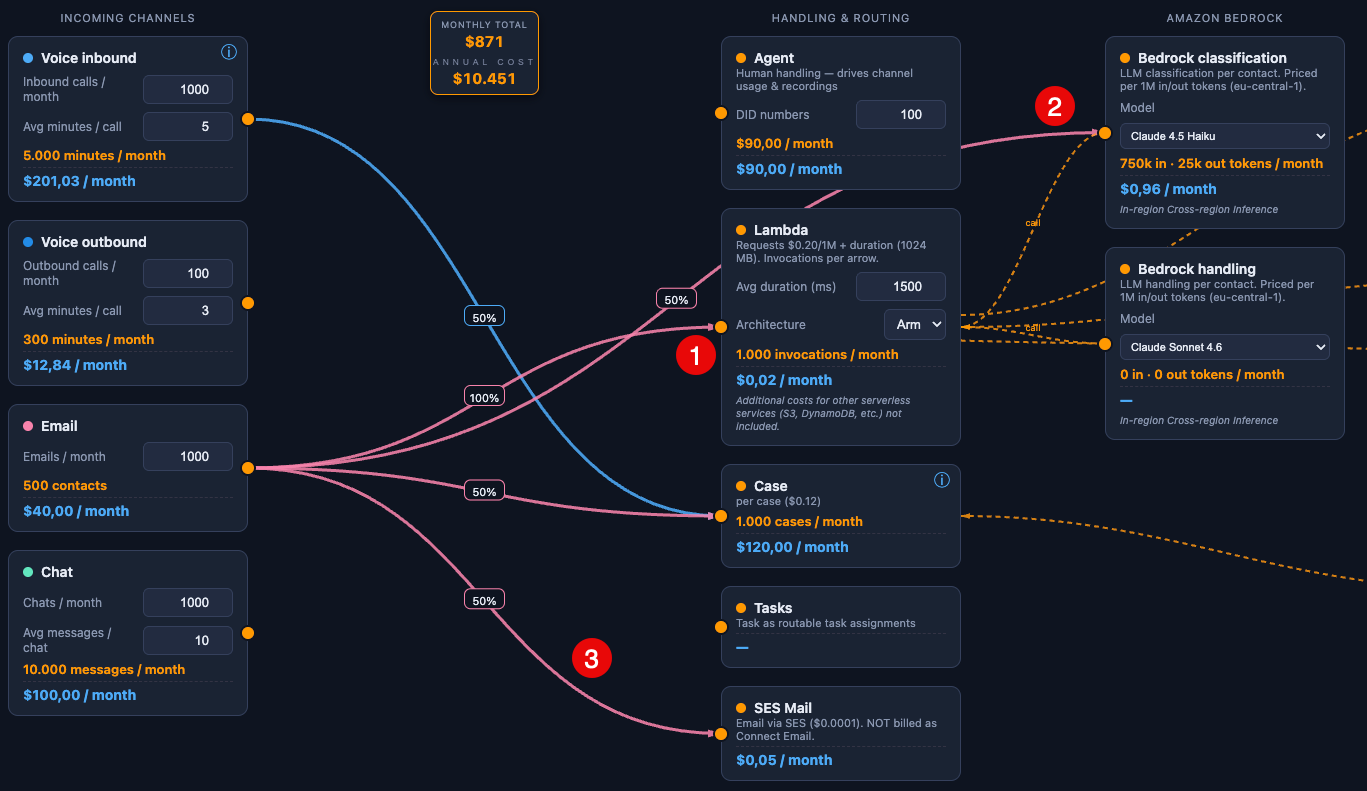
Now we add an intelligent classification with Lambda (1) calling Amazon Bedrock (2), and using SES to send answer mails (3).
If you can automate 50% you get a drop from $910 to $871 per month. That is a reduction of $39, or about 4%. The saving comes from the Email line item: 500 fewer emails at $0.08 = $40 less per month. The reason this pays off is the price gap between the two channels. An email handled as an Amazon Connect contact costs $0.08, while sending the automated reply through Amazon SES costs only $0.0001 per email, about one eight-hundredth of a Connect email contact. So every email we move from a Connect contact to an SES reply replaces an $0.08 item with a near-zero one, which is why automating half of them removes almost the full $40. Lambda, Bedrock and SES add back about $1, so the net saving is $39.
Monthly base cost $871.
AI Voice automation
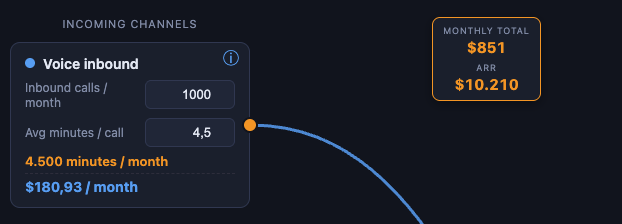
All calls which are handled by human agents usually have a “Choose your request”, “choose your intent” in the beginning. Let’s call this the two-phase strategy. This happens at the start of a call either through touch-tone keypads or with voice commands.
When we built an AI bot for our customer, callers are immediately greeted with, “What is your request?”
On average, this is faster than the two-phase strategy. Let’s say we save half a minute per call. Across 5,000 inbound voice minutes that cuts about 500 minutes, so at the effective $0.0402 per minute (voice $0.038 + DID $0.0022) inbound voice drops from $201 to $181, roughly $20 less per month.
Monthly base cost $851.
Now we take the “wait in line” into account. Imagine yourself as a customer from a telephone service. How annoying is it to wait for you to be in line?
I myself usually put the phone on loudspeaker and put it on the table. And if I wait more than a few minutes, then I hang up.
With an AI-based telephone automation, the customer does not have to wait for an open line and an available agent.
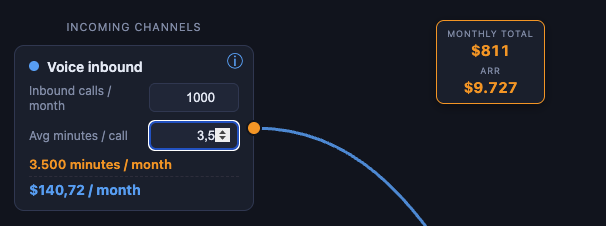
This waiting time is billable Amazon Connect voice time, not agent labor, so removing it lowers the technical cost directly. Starting from an average of 4.5 inbound voice minutes per call, we assume the average wait in line is 1 minute and remove it, bringing each call down to 3.5 minutes. Across 1,000 calls that is 1,000 fewer minutes at $0.0402, so inbound voice drops from $181 to $141, about $40 less per month.
Monthly base cost $811.
The unit prices are real AWS list prices; the contact volumes are illustrative, though based on patterns we see with real customers. We reduced the technical cost from $910 to $811, a saving of $99, or about 11%.
And we have not taken into account the costs for the human agents. Automation is the key to reducing the cost for human agents. And typically, the cost to automatically resolve a customer request with AWS services is just a fraction of the labor costs for human agents.
Summary
We’ve shown you a few examples of how to change your idea of price estimation and how the architecture and your decisions affect the pricing. This is not an open-source project, but a tecRacer-internal tool because finding the right price estimation is a complex process and a tool only supports you.
The main point is that you have to show changes visibly so that it’s understandable for everybody.
And that you know all the implications of that.
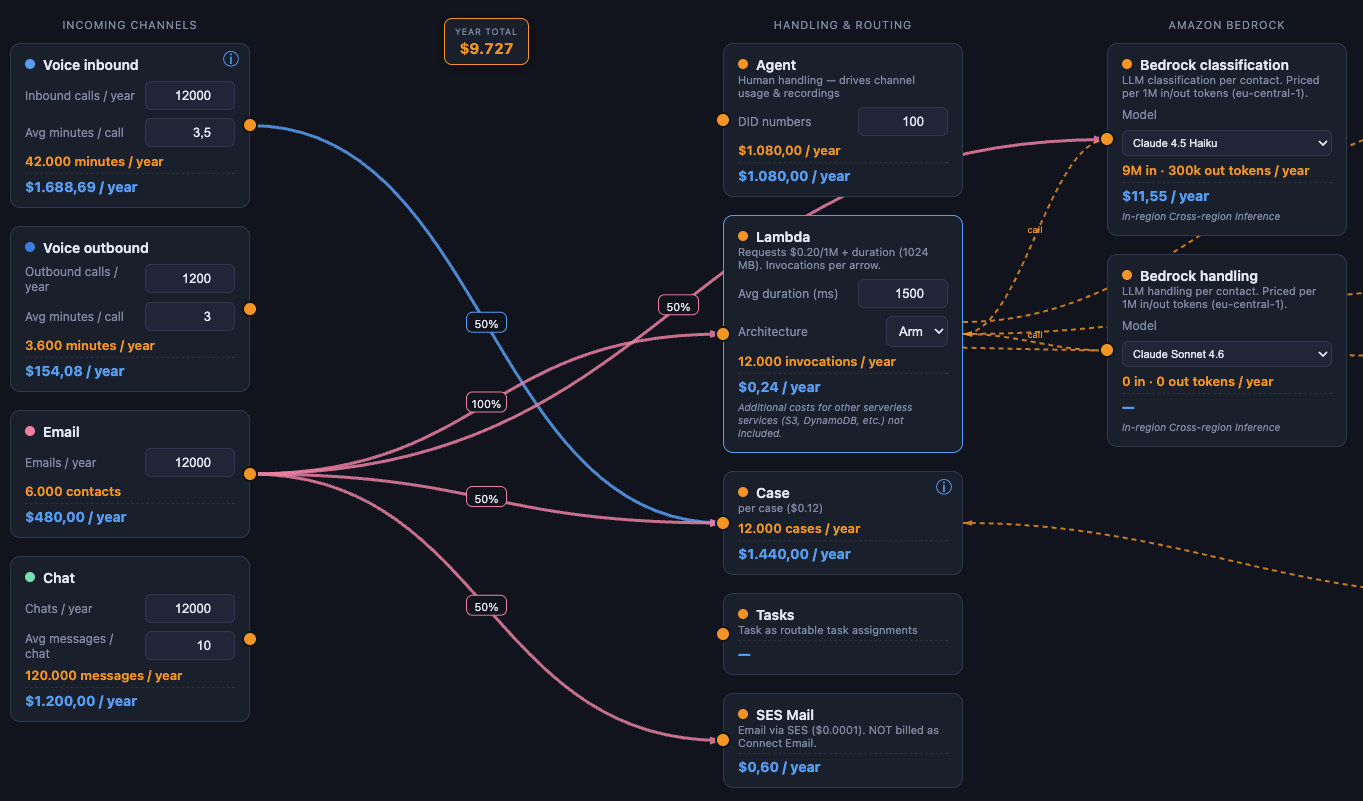
With our flow-based strategy visualization, we help customers to discuss and understand the process changes and the implications of that change.
Running a contact center? Send us your contact volumes and channel mix. We model your Amazon Connect cost and show you, how automation can reduce your contact center costs: tecRacer!
Thanks to
Photo by engin akyurt on Unsplash
Caveats
This post has partly been supported by GenAI. The costs are only for explanation. This is not cost advice. Actual usage pricing may vary.